Monthly maintenance report
A principal with 600 doors shouldn't have to ask four people how last month went. On the 1st, one e-mail says what stands out, what it cost, who did well, and what's due next. The same report is in the app, and as a PDF for the board or the owners' committee.
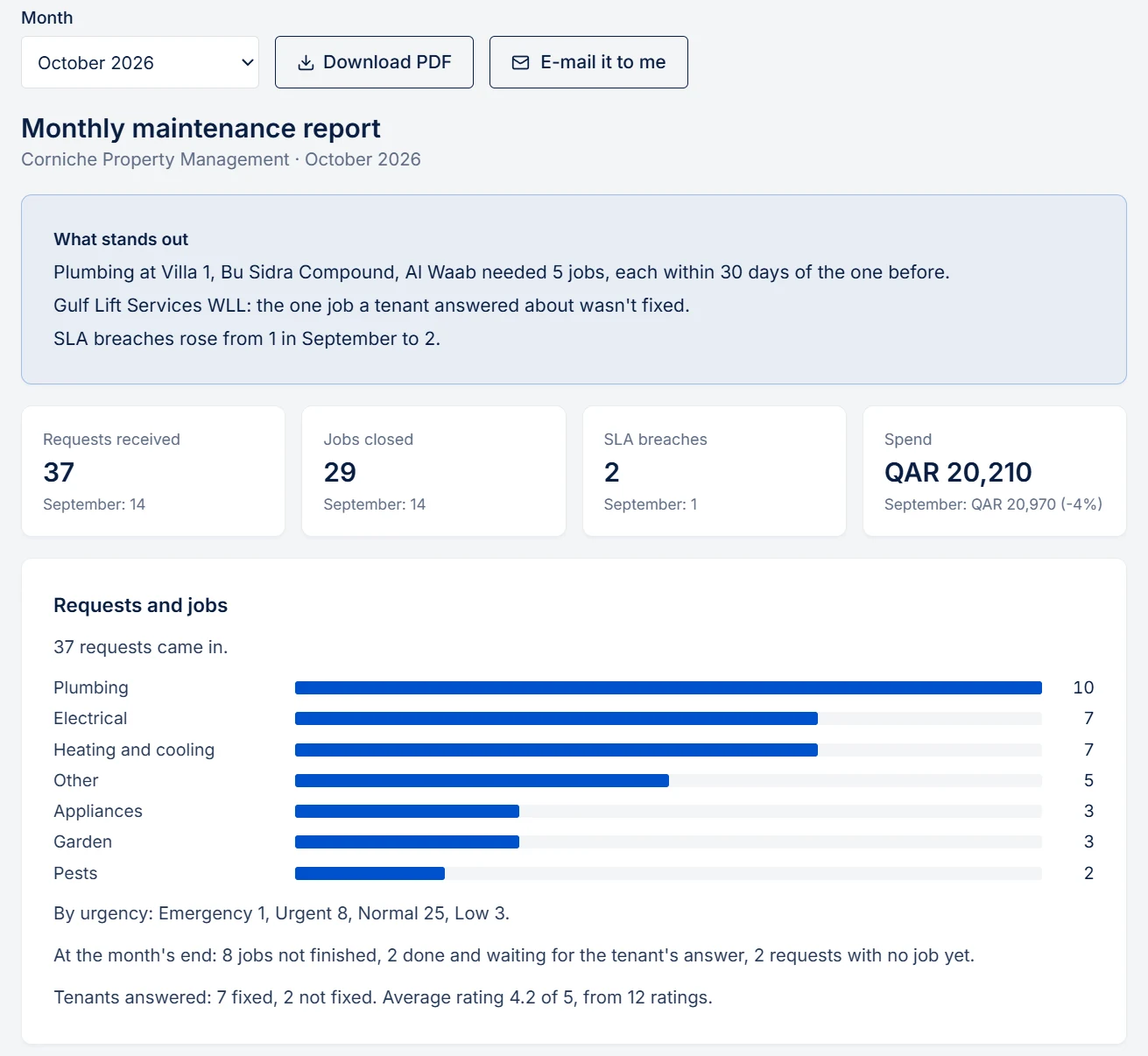
What it covers
- What stands out. Up to three lines at the top: a unit that keeps failing, a contractor whose work tenants sent back, a swing in spend, SLA breaches going up or down. Rules pick them from the figures below, so every number in them is one you can see further down.
- Requests and jobs. What came in, by kind and urgency. Jobs closed. What was still open at the month's end. What tenants answered when asked "did it get fixed?", and their ratings.
- SLA breaches. Requests that passed their deadline without a job, against the month before, the most urgent first.
- Repeat faults. Jobs on the same thing, each within 30 days of the one before. If the job names the unit, it's that unit. If not, it's the same kind of repair at the same address. Routine work doesn't count: planned maintenance, compliance jobs, cleaning and gardening come round by design.
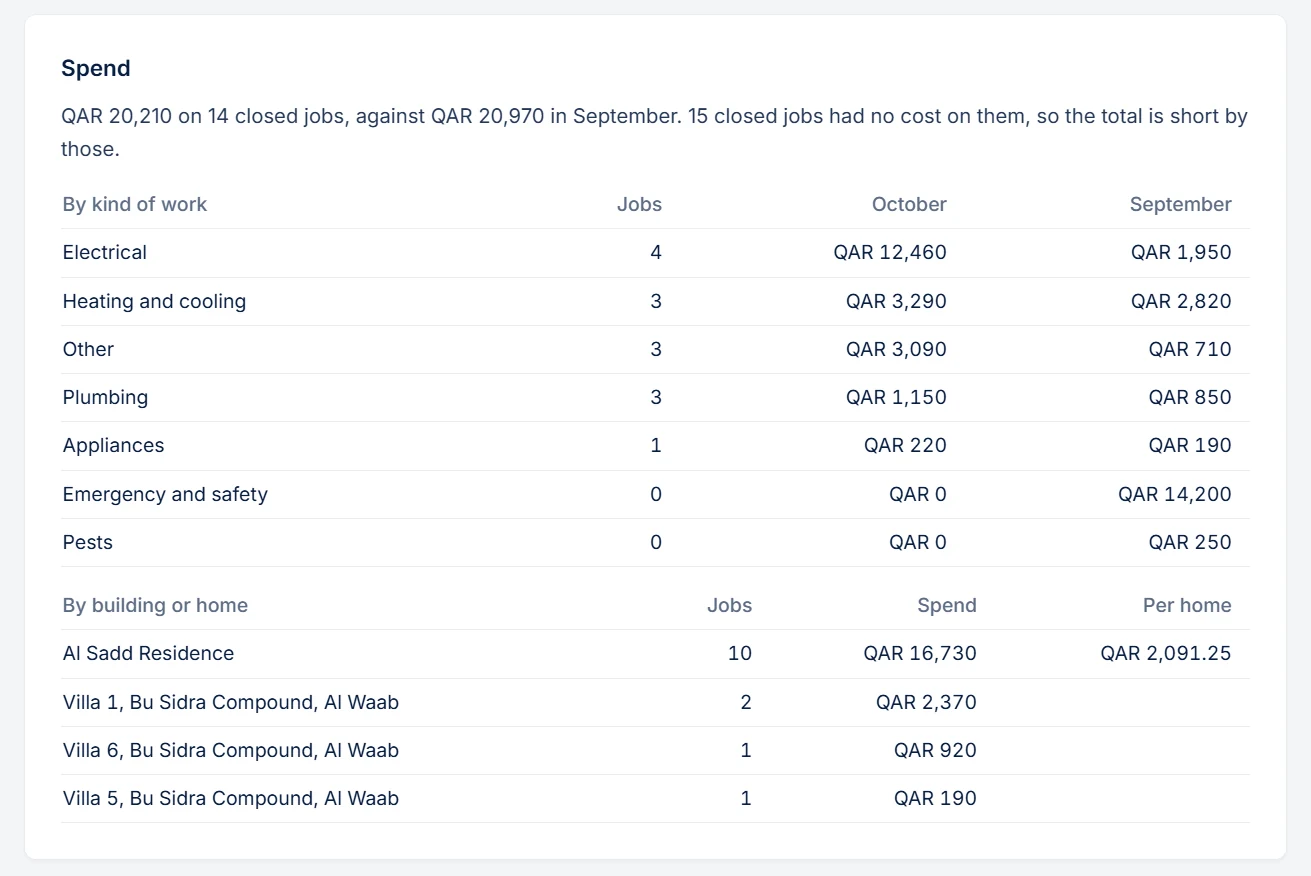
- Spend. Closed jobs with a final cost, in the month they closed, by kind of work and by building or home. A building's homes add up to the building, with a figure per home. If some closed jobs have no cost on them, it says so, because the total is short by those.
- Contractors. Who had jobs reported not fixed, and who did at least two jobs with none reported not fixed. Their rating is tenants' average over 12 months, shown from three ratings.
- Coming up in the next 30 days. Compliance due and overdue, service contracts to decide, warranties ending, contractors' insurance and licences. This is the part a report about the past usually leaves out.
How you get it
- By e-mail on the 1st, at about 08:00 (Doha time for an agency in Qatar, Sydney time for one in Australia), to every admin of the agency, with a PDF. If our service is down that morning, it goes on the next day, up to the 3rd. Nobody gets it twice. A month with nothing in it sends nothing.
- In the app, under Monthly report: any month, including the running one so far. Anyone on the team can read it and download the PDF.
- "E-mail it to me" sends the month you're looking at to your own inbox, at once.
- In Claude or ChatGPT: ask for last month's report through the connector.
An admin turns the e-mail on or off in Settings → E-mail and alerts → Monthly report. It's on for new agencies. Agencies that were here before it arrived start with it off, so turn it on when you want it.
What's deliberately not in it
- No tenant names or messages. Addresses and contractors' names only, so you can forward it.
- No timings per stage. How long jobs spend in each status is for the connector, not a page your team reads every day.
For owners
This report is for you. For owners, there's the owner update: PMFriend drafts one per owner on the schedule you set, about their property only, and you review it before it goes.
How the figures are counted
- The month runs on the same clock: Doha for an agency in Qatar, Sydney for one in Australia.
- A report reads the same when you open it later. "At the month's end" is worked out from the dates on the jobs, not from how things stand today. Only "Coming up" is about today, and it shows only for last month and the running one.
- The spend figure matches the one the connector gives for the same month.
In Qatar
Towers add up to the building, in QAR, with a figure per unit. "Coming up" names the Qatar checks and papers: Civil Defence, Kahramaa licences, service contracts for lifts and chillers. The e-mail and the app show Arabic names as they are. The PDF's font has no Arabic letters, so an Arabic name there reads (Arabic name: see the app).
On the public sandbox
The sandbox has three months of sample jobs, so you can open the report and download the PDF. It sends no e-mail: "E-mail it to me" says so.