How email works in PMFriend
The shared inbox first-pass — read, sort, match the sender, decide what's maintenance — eats about an hour a day. AI classification and tenant matching do that pass for you: ~10 staff-hours a month back per PM, and an urgent report emailed at 11pm is triaged before anyone sits down in the morning. Indicative figures; every portfolio differs.
PMFriend uses email in two directions: incoming (tenants emailing your support address turn into maintenance drafts) and outgoing (notifications, confirmations, occasional digests). Both are designed so you don't have to think about deliverability or DNS — just point your existing support inbox at us once and we handle the rest.
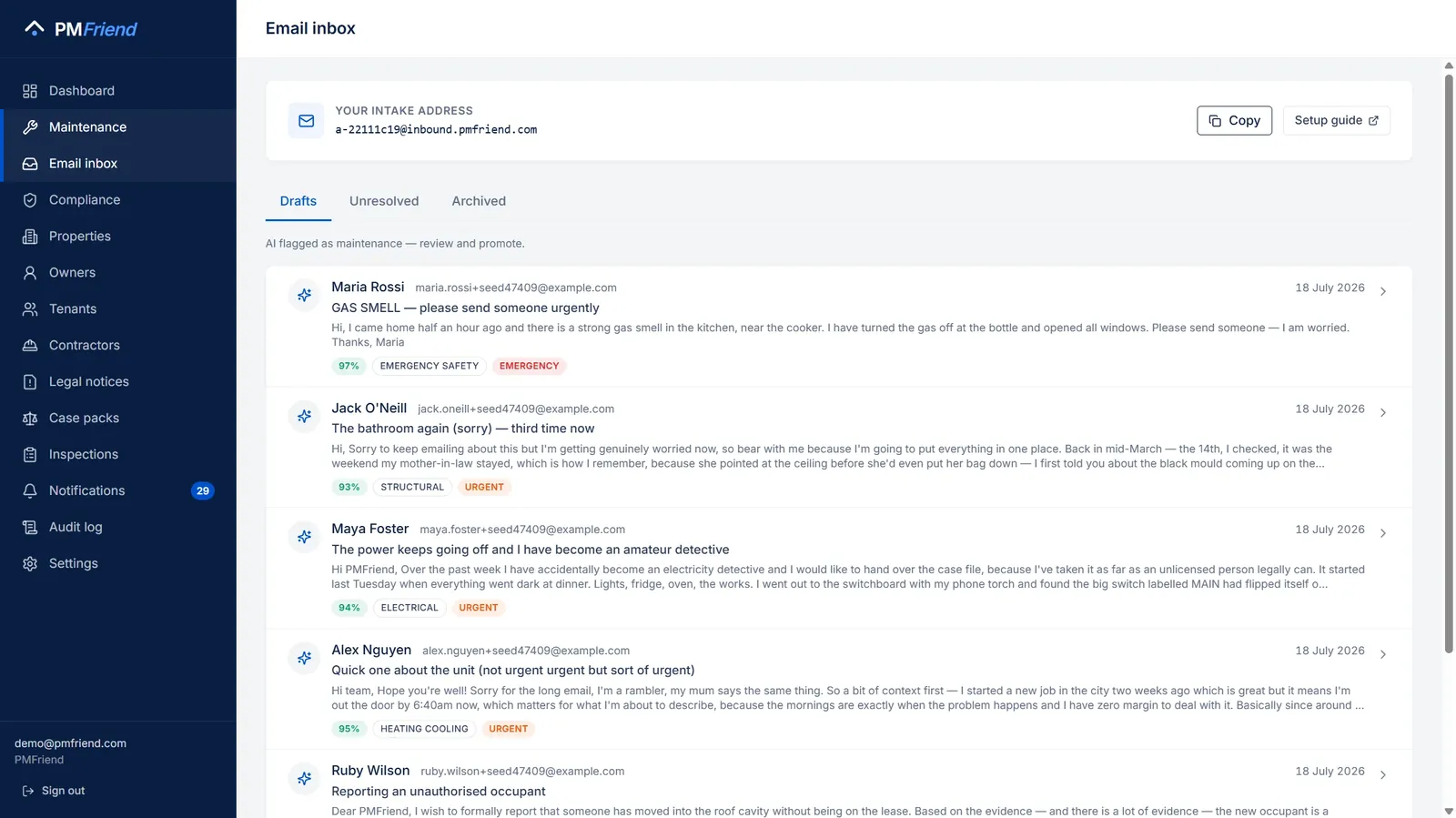 Where to find it: sidebar → Inbox (WhatsApp and e-mail in one queue). Every email your support address received, already read and classified — one click turns it into a maintenance request.
What your tenants see
Your tenants don't change anything. They keep emailing the support
address they already have on file (e.g. support@your-agency.com.au).
You set up a one-time forwarding rule on that mailbox to PMFriend's
intake address, which we generate for you when you sign up.
Every email arriving at the intake address is:
- Auto-classified by AI — is this maintenance? what category? how urgent? where in the property?
- Surfaced as a draft in your Email Inbox tab inside Maintenance, ready for one-click promotion to a real maintenance request, or
- Archived if it's clearly not maintenance (a rent query, newsletter, off-topic forward).
Your tenant never has to learn a new address, install an app, or remember a portal login. The friction stays at zero on their side.
Tenants on your books also get an instant confirmation reply — "we've received your message and are onto it" — written in the language they emailed in (Arabic, Hindi, Urdu, Tagalog and more). Unknown senders don't get automatic replies; their messages queue for your manual review.
Nothing a tenant writes disappears. A message that isn't a repair ("what is the status?", "can I have a rent receipt?") stays in Drafts, marked Question — not a repair. You answer it in the conversation and click Mark as answered, or turn it into a repair request if it turns out to be one.
"Where is my repair up to?" gets answered straight away. If a tenant asks while one of their requests is open, the automatic reply isn't a generic "we got it". It tells them where the request is up to, in their own language: Visit scheduled: Wednesday 24 September, 10:00–13:00, the contractor, and their tracking link. The question still lands in your Drafts, so you can add anything more.
When a tenant writes again about a request, it stays with that request, on WhatsApp and by e-mail. "Any news?", a photo of the leak, "the plumber didn't come" — once you have made their message a request, what they send next goes into the same conversation, not into a new message you have to match up by hand. By e-mail that means a reply to the same conversation (the "Re:" subject): we keep what they wrote and leave out the old e-mails their mail program quotes underneath. A new photo also goes onto the request itself, so the contractor sees it too. And if the new message says it has become an emergency ("there is smoke coming out of the unit"), your on-call number gets the same WhatsApp alert a new emergency report gets, once. It shows at the top of Drafts marked New message · on a request, with what they wrote. Open it and their new messages are at the end of the conversation: reply there, which marks it as read, or click Mark as read if nothing needs saying. If the tenant had heard nothing for a day, they also get an automatic note with where the request is up to and their tracking link. This lasts while the job is open. Once it is completed, a new message starts a new conversation. If they report a different kind of repair ("also, the kitchen tap leaks" on an air-conditioning job), that becomes its own draft, as a new request should.
Photo attachments come through — a tenant photographs the problem, the photos appear in the inbox next to the email, and they travel onto the maintenance request where the AI reads them when suggesting category and urgency. And every inbox message has a reply box: your answer goes out by email, and the tenant's response comes back into the same conversation. On WhatsApp the inbox shows the exchange as one conversation — their message, your question, their answer — and promoting it carries the whole conversation onto the request.
Everyone in their own language
Your tenant writes in Arabic, Hindi or Tagalog; you read it in English, or whichever language you pick next to Conversation (Read in). Every message shows Translated from Arabic with a show original link, so you can always check what they actually wrote.
You answer in your own language too. When the tenant writes in another language, the reply box offers Send in customer language (Arabic), naming whichever language they wrote in (Hindi, Tagalog, …): the tenant receives your answer translated, with your original words underneath. In the conversation you see what you wrote, marked Sent in customer language (Arabic), and one click shows exactly what the tenant got. If the translation can't be made at that moment, nothing is sent. You choose whether to try again or send it as written.
The same applies to the Reply to tenant drafts on the home screen's Attention inbox: the draft appears in your language and goes to the tenant in theirs.
Translations are made by AI (Anthropic Claude) and kept, so opening the conversation again is instant. For anything with legal weight, such as a notice or an amount, check the original.
The completion email asks "did it get fixed?"
When a work order is completed, the tenant's email carries two buttons — Yes, it's fixed and No, still not fixed. One tap, no login. A "no" flags the job for you (Attention Inbox + notification) and is remembered against the contractor. Links work for 14 days; the tenant's latest answer wins.
What gets emailed out
The platform sends transactional email for these flows:
- Pilot application confirmation — when an agency principal applies via the public form, they get a "we got it, talk soon" confirmation, and we get a heads-up notification.
- Welcome email — when an agency signs up, the admin gets a short setup guide pointing at email-intake setup, CSV imports, and team invites.
- Confirm your e-mail — sent with the welcome email when you sign up with an e-mail and password: one link, valid for 48 hours. See Confirming your e-mail.
- Password reset — request a reset, follow the link, confirm with a "your password was changed" email so suspicious activity is obvious.
- Team invite — when a PM invites a colleague, the colleague gets an "Accept invite" email with a one-click link. The PM also sees the URL in the dashboard as a fallback if the invite gets lost.
- Owner digest — the digest you draft on the Owner page is sent via email when you click Send. Plaintext-first so it lands cleanly in any inbox.
- Contractor magic-link — when you assign a contractor to a work order or issue them a magic link from the Contractors page, an email goes out automatically with the secure URL the contractor uses to view the job, update status, and upload photos. No more copy-pasting the link into SMS.
- Owner approval request — when a quote exceeds the owner's pre-approved threshold, the property's primary owner gets an email with the scope, contractor, and estimate, asking them to reply to you with their decision. They no longer need to be logged in to see the request.
- Tenant maintenance status updates — the tenant who reported the issue is kept in the loop with three short emails: "we've received your report" (after triage), "a contractor is on their way" (after dispatch), and "the job is complete" (after the contractor marks done). Each one points the tenant back to you for follow-up questions.
We deliberately don't fire automated marketing emails, drip sequences, or reminder spam. Every email we send is in response to a specific action a person took.
Sender identity
Outbound mail comes from support@pmfriend.com, signed with DKIM and
DMARC-aligned. Recipients see PMFriend in the From: line; this is by
design so a tenant who later forwards a notification to their agent
sees a verifiable PMFriend brand.
If your agency hits Scale tier and wants white-label outbound (mail
sent from your own your-agency.com.au domain), that's a roadmap
feature — speak to support.
Unsubscribe
Every email we send carries a per-recipient unsubscribe link in the footer. Clicking it adds the address to a global suppression list and nothing further is ever sent to that address from PMFriend, regardless of which agency might try to write to it.
The unsubscribe link works for the lifetime of the address; we use it ourselves to verify the suppression flow.
Mail clients like Gmail and Apple Mail surface a native one-click "Unsubscribe" button (the RFC 8058 standard); we wire that too. So tenants can opt out from inside their inbox, no website visit needed.
What happens when an e-mail bounces
Sometimes an e-mail can't be delivered: the tenant mistyped their address, left their job and the work mailbox is gone, or the address never existed. And sometimes a person clicks "Report spam" on a message instead of unsubscribing.
- The address doesn't work (a "hard bounce") — PMFriend stops sending to it straight away. Sending again and again to a dead address makes mail providers trust all your other e-mail less, so your tenants' repair updates would start landing in spam.
- The person marked the e-mail as spam — PMFriend stops sending to them too. Contact them another way (phone, WhatsApp).
- A temporary problem (mailbox full, their server busy) — nothing changes. We keep sending; those usually clear up by themselves.
Where you see it. When you reply to a tenant from the inbox, or send a reply from the Attention Inbox, a blocked address shows Not sent — the address bounced on 12 Sep 2026 (or marked an e-mail from PMFriend as spam), with what to do next. Nothing is sent, and nothing else in your workflow stops: the request, the work order and the notes all carry on.
Settings → E-mail delivery (agency admins) lists your contacts we've stopped e-mailing: tenants, owners, contractors, your team, and people who e-mailed your intake address. Once the problem is fixed — the tenant cleared their mailbox, or gave you a corrected address that you've saved on their record — click Lift block. If the address bounces again, it's blocked again. For someone who marked your e-mail as spam, only lift the block if they've asked to hear from you again.
The block is on the address, not on your agency: an address that doesn't work, doesn't work for anyone. You only ever see your own contacts in the list, never another agency's.
If the intake goes quiet
A forward that silently stops is worse than one that fails loudly. When your intake address has received nothing for seven days (after it was working), PMFriend flags it in the Attention Inbox and emails every agency admin — once a week until messages arrive again. Check the forward rule in your mail system and the intake address in Settings.
Spam protection
Three layers protect both your agency's reputation and our intake infrastructure:
- Sender allowlist — emails arriving from senders we have on file as your tenants flow straight to AI classification. Senders we don't recognise land in an "Unresolved" queue for you to triage manually.
- Rate limiting — even if a misbehaving forwarder accidentally pointed a mailing list at the intake address, the AI classifier is capped at 100 calls per agency per day. Above that, classification falls back to keyword-matching (less precise but free), so your AI bill is bounded.
- AI-as-spam-filter — mail from senders who aren't your tenants (newsletters, unsolicited offers) waits in Unresolved and never gets an automatic reply. From your own tenants, nothing is archived without you deciding so.
Privacy posture
You can confidently tell tenants and owners:
- We send only the subject and plaintext body of an inbound email to the AI classifier (Anthropic Claude). Sender address, recipient address, and agency identifiers stay in our own database and never go to the AI. When you read a conversation in another language, or send a translated reply, only the message texts go to the AI for translation.
- We don't sell, share, or repurpose email contents.
- Suppression decisions (unsubscribes, addresses that bounce, spam complaints) are global to PMFriend, not per-agency, so a person who has opted out is honoured permanently. We keep only the address, what happened and when — never the message.
- Our
pmfriend.comdomain is signed with DKIM and publishes DMARC reports we monitor weekly.
Setup steps for your agency
- Settings → Email intake — copy your unique intake address.
- Forwarding rule on your existing support mailbox (Office 365, Gmail Workspace, or cPanel — instructions for each are on the same Settings page).
- Test — email yourself at the intake address; the message should appear in the Email Inbox tab within seconds.
- First mail from a tenant lands in either Drafts (if their sender email is on file) or Unresolved (if not). Resolving an Unresolved row remembers the sender's address as that tenant's alias for future mail.
That's it. Five-minute setup, then it runs forever.
What's coming
The remaining email-side roadmap items:
- Owner one-click approval URLs — the owner approval email is informational today; the owner replies to the PM. A direct approval / rejection portal (signed link, no login) is planned once a paid customer asks for it.
- Threaded conversations — when a tenant replies to a status update, the reply attaches to the existing draft / request rather than creating a new one.
Email verification at signup— shipped: see Confirming your e-mail.Bounce + complaint auto-suppression— shipped: see What happens when an e-mail bounces.
See the Roadmap for status.