Contractor management
No contractor portal means zero onboarding cost and zero "I forgot my password" tickets. Status flows back through the magic link, so nobody makes the ~15-minute where-are-we-at call per job — across 60 jobs a month that's 15 staff-hours of phone tag gone. Indicative figures; every portfolio differs.
PMFriend treats contractors like adults. They don't get logins, they don't have to remember passwords, they get a one-time link that takes them straight to the job.
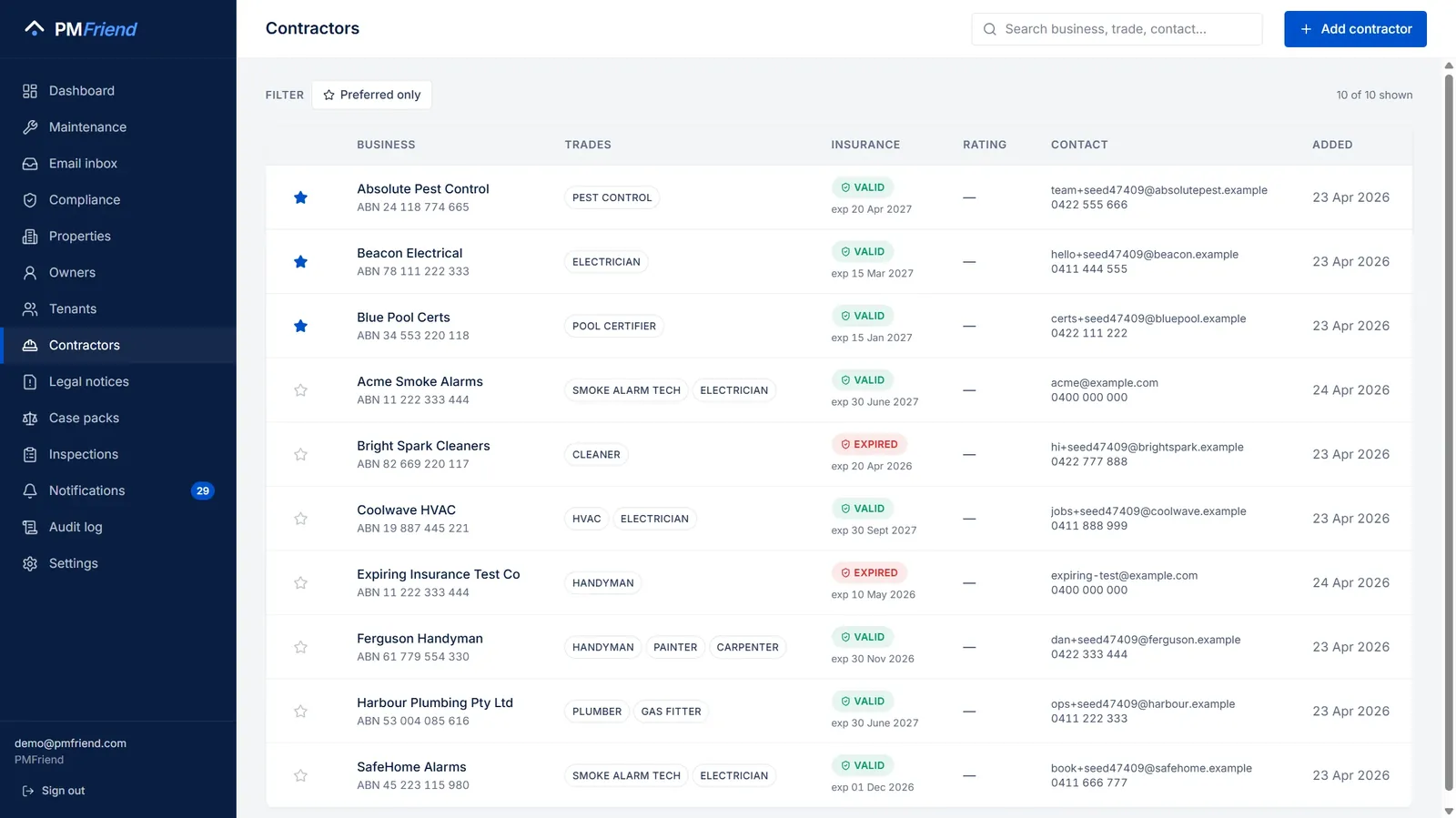 Where to find it: sidebar → Contractors. Trades, insurance expiry warnings, and who's preferred — the ranked picker draws on this when you dispatch.
How dispatch works
When you dispatch a maintenance work order:
- PMFriend generates a unique URL like
app.pmfriend.com/jobs/cL0Jk_EUToChI... - We email or text it to the contractor (today: you copy the URL into your own email; coming soon: PMFriend sends directly via SES)
- The contractor clicks. They see a page showing:
- Who they are ("You're signed in as Watertight Plumbing")
- The job scope, property address, scheduled time
- Accept / Decline buttons
- A field to add their final cost + completion notes when done
- The link is valid for 14 days. After that they need a new one.
That's it. No portal account. No password reset emails. No "I forgot my login" support tickets.
The ranked picker
When you're picking a contractor for a job, PMFriend ranks your contractor list by relevance to this job at this property:
- Trade match — Plumbing for plumbing jobs, etc. An appliance job that mentions water (a washing machine leaking, a dishwasher drain) suggests plumbers and handymen; a dry fault such as a fridge not cooling suggests handymen and electricians
- Insurance status — contractors with expired insurance are pushed to the bottom (and visually flagged)
- Your manual ⭐ Preferred flag — the people you trust
- Track record over the last year — "2 of 4 jobs reported not fixed" pushes a contractor down; "5 jobs, none reopened" and "fast: median 2d" lift them. The data comes from tenants answering did it get fixed? after each job (see Maintenance) and from how long jobs actually took — not from anyone's opinion.
You always see the full list and can pick anyone. The ranking is just the AI's opinion, not a hard restriction.
Contractor scorecard
The Contractors page shows, for every contractor, how their work turned out over the last 12 months:
- Jobs (12 mo) — completed jobs, plus how many are still open
- Not fixed — how many tenants answered did it get fixed? with "no", out of those who answered (red when it's a pattern: at least a quarter of two or more answers)
- Median days — how long a job typically takes from work order to completion
Switch on Most "not fixed" first to see whose repairs keep coming back. The same numbers are what the ranked picker uses, and your director can ask ChatGPT or Claude "which contractor keeps coming back?" through the portfolio connector.
Insurance tracking
For each contractor, you can store:
- Public liability insurance expiry date
- Business registration: the ABN in Australia, the CR number in Qatar (the field is labelled to match your agency's currency)
- In Australia, trade licence numbers, checked against the public register (see below)
PMFriend reminds you 30 days before the insurance expires. A contractor with expired insurance still appears in your list but with a visible flag — and they're pushed to the bottom of the ranked picker until they're current again.
💡 Real-life example: A new pool-fence repair job comes in for a QLD property. Sarah opens the picker. Brisbane Pool Solutions would normally rank first (they did the last job at this property), but their public liability expired 12 days ago. PMFriend shows them 4th in the list with a red "Insurance expired" tag. Sarah picks a different contractor and pings Brisbane Pool to renew their certificate.
Check the ABN and the trade licence (Australia)
Open a contractor and you'll find Public registers. It shows what the government's own registers say, so you're not relying on a business card:
-
ABN. Press Check ABN and PMFriend asks the Australian Business Register. You see:
- whether the ABN is active or cancelled;
- the name it is registered to, and any trading names;
- whether the business is registered for GST.
If the ABN belongs to a differently named business, you get a warning: worth a call before the next job. A mistyped ABN is caught straight away.
-
Trade licence (NSW). Type the licence number from their quote or card and press Add & check. PMFriend asks NSW Fair Trading's public register for:
- the status (current, expired, suspended, cancelled, or not on the register);
- the licence holder;
- the licence type and classes;
- the expiry date.
You can record more than one licence, for example electrical and plumbing.
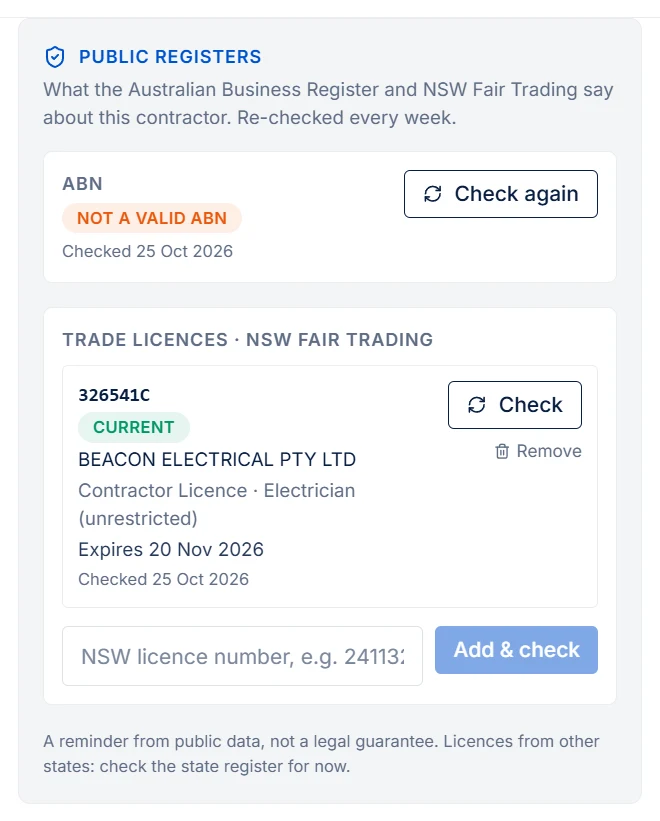
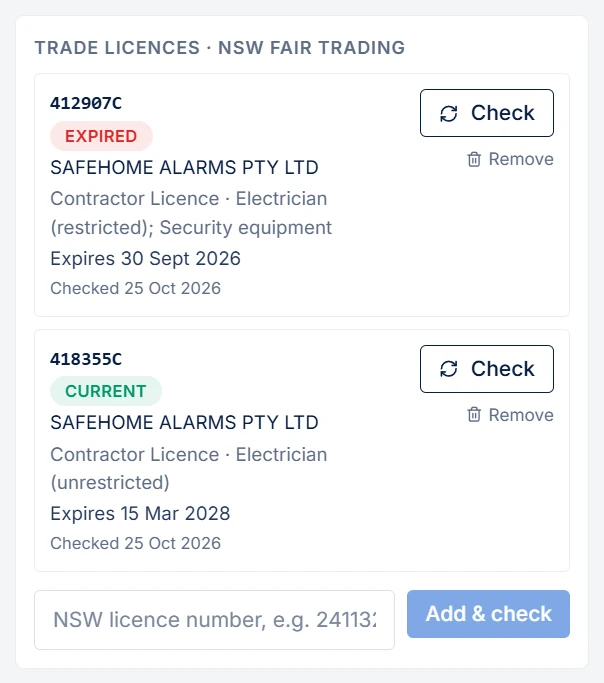
You don't have to remember to check again. PMFriend re-checks every contractor's ABN and licences every week and tells you when:
- a licence expires within 30 days;
- a licence is no longer current, or isn't on the register at all;
- an ABN is cancelled, unknown, or registered to someone else.
A click on the alert opens that contractor.
💡 Real-life example: On Monday morning Sarah sees "Harbour Electrical — trade licence not current". The weekly check found that the NSW licence expired last week. She calls them before booking Thursday's switchboard job, and the renewal arrives that afternoon.
This is a reminder built on public data, not a legal guarantee: the contractor stays responsible for holding the right licence for the work. Licences from other states (QBCC in Queensland, the VBA in Victoria and the others) aren't checked yet; look those up on the state's own register for now.
Translate the job into their language
Many trades workers understand some English but not enough to follow written instructions confidently — details get lost, or someone has to explain the job over the phone. On the job page there's a language dropdown and a Translate button. In Australia it offers Chinese, Vietnamese, Arabic, Korean, Punjabi, Hindi, Nepali, Portuguese, Spanish, Tagalog, Greek and Italian; in Qatar and the Gulf, Hindi, Urdu, Malayalam, Tamil, Bengali, Nepali, Tagalog, Sinhala, Arabic, Ukrainian and Russian. One tap and the job scope is rewritten in their language, with a toggle back to English any time. No app, no setup, nothing for you to do.
It's a genuine time-saver: the alternative is someone in the office translating each task by hand (or the worker guessing). The translation covers the job instructions themselves; if it's ever unavailable, the page just shows the original English rather than a wrong guess.
What contractors see vs what they don't
The magic link gives them:
- The address, scope, scheduled time, cost ceiling
- Whatever you decided about getting in: the tenant's phone number (only if you ticked it), the visit window you agreed with the tenant, and an access note (e.g. "use side gate, dog in yard") — see Getting in
- Owner first name (in case they need to escalate)
- Your agency contact phone
It deliberately does NOT give them:
- The owner's contact details, or the tenant's unless you shared them for this job (everything else goes through you)
- Other jobs at the same property done by someone else
- Any other agency data
- A password or a persistent login
Each link is tied to one job, but underneath it every link also lists that contractor's own other open jobs, so a plumber with three jobs this week opens any one link and taps through to the rest. Nothing else is visible — only jobs assigned to them.
Contractor onboarding
When you add a new contractor:
- Just business name + email/mobile to start
- Add ABN, trades, insurance dates as you have time
- Mark Preferred for the ones you go to first
You don't need to onboard your full vendor list before going live. Start with your top 5–10 and add the rest as jobs come up.
Their portal link, and the one-time identity check
On the contractor card, Issue magic link creates the contractor's portal link. Send it once on WhatsApp. When they open it:
- First visit: they see the business details you hold and tap Yes, these details are correct. That's a one-time check; the card shows a verified tick from then on and the question never comes back.
- Every visit: their list of open jobs, soonest first, with the property and the scheduled time. One tap opens the job. If nothing is assigned to them yet, the page says so — it's not broken, it's empty.
Every dispatched job still sends its own direct link, so a contractor never has to go looking for work you've just assigned.
Lost the link? Send it again
The work-order card keeps a Contractor link box for as long as the job is open. New link gives you a fresh one to copy (the old one keeps working until it expires). Send on WhatsApp sends it from your agency's WhatsApp number with the job, the address and — if you included it — the gate pass. If WhatsApp refuses (the contractor hasn't written to your number in the last 24 hours), you see that immediately and can copy the link and send it yourself.
The job page itself now shows where to go: the property address with a Map button that opens it in Google Maps. On an iPhone or iPad there is also an Apple Maps button.
A photo of the way in. On the property page (Overview → The way in), add one photo of the entrance, the gate or the right tower door. While a job at that property is open, the contractor's job page shows it under the address (tap to enlarge), so a technician finds the right door without calling you. Replace photo swaps it; Remove takes it off the job page (the photo stays among the property's documents). JPEG, PNG or WebP, up to 8 MB.
Getting in: the tenant's number, or a time you agreed
The most common reason a job stalls after dispatch is that nobody can get into the flat. When you dispatch (and at any time afterwards from the work-order card, Getting in → Change), you decide how that happens:
- The contractor arranges the visit directly. Tick Share the tenant's
phone number and the number goes on the contractor's job page (tap to
call) and in the WhatsApp dispatch message. The tenant is told: their
"contractor assigned" message ends with "
may call you on this number to arrange a time." Leave the box unticked and the contractor arranges access through you, as before. - You agreed a time with the tenant. Enter the day and the window (say Thursday 09:00–12:00). The contractor's page and WhatsApp message show Agreed with the tenant: Thu 24 Sep 09:00–12:00, and the tenant's tracking link shows the same window. You can still share the number as well, for the "I'm running late" call: with an agreed time, the job page says call before you come, or if you can't make the agreed time (and the WhatsApp message call before you come) instead of call to arrange a time.
- An optional access note — gate code, ask for the watchman, where to park — goes to the contractor either way.
Times are the property's time. A PM in Berlin typing 09:00 for a flat in Doha means 09:00 in Doha, and the tenant, the contractor and your screen all show 09:00 (with "Qatar time" next to it when your own clock differs). If the contractor books a time outside the window you agreed, the work order says so in amber.
The phone is optional in every case and it is your call per job. If the request has no phone on file (an e-mail-only tenant), the box cannot be ticked — PMFriend tells you rather than sending the contractor an empty field. Nothing here changes the job's status or who closes it.
Keys: who has which key, and when it comes back
When the tradie needs a key, add it on the job card under Keys → Add a key:
- which key ("Front door + mailbox, tag K-12");
- where to collect it (the office, the lockbox at the side gate, the building manager);
- when it must be back (optional).
The keys are in the WhatsApp message the tradie gets with the job, before they open the link: Key: Front door + mailbox, tag K-12 · collect from the office · back by Wed 28 Oct. On their job link each key has I've collected the key, then I've returned the key. Under the access instructions there is also I've read how to get in, so you know they saw the gate code or the agreed time before they turned up. The job card shows where every key is: not collected yet, with the tradie since …, returned ….
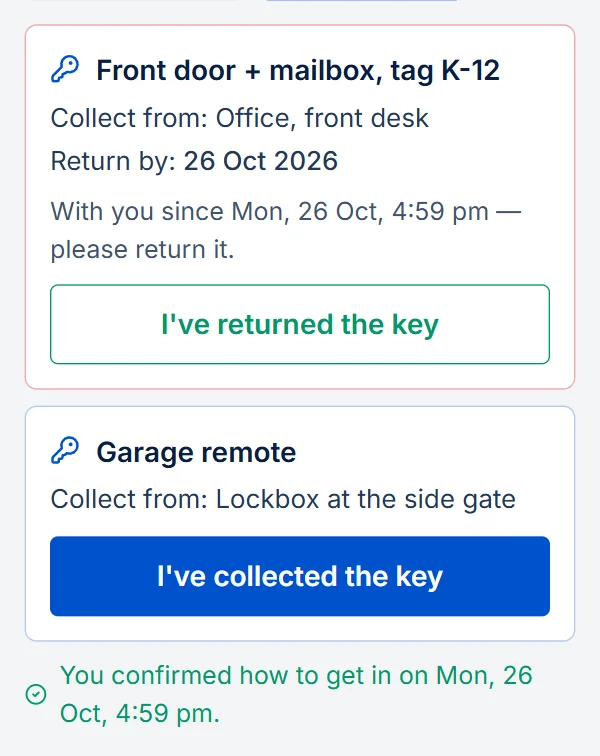
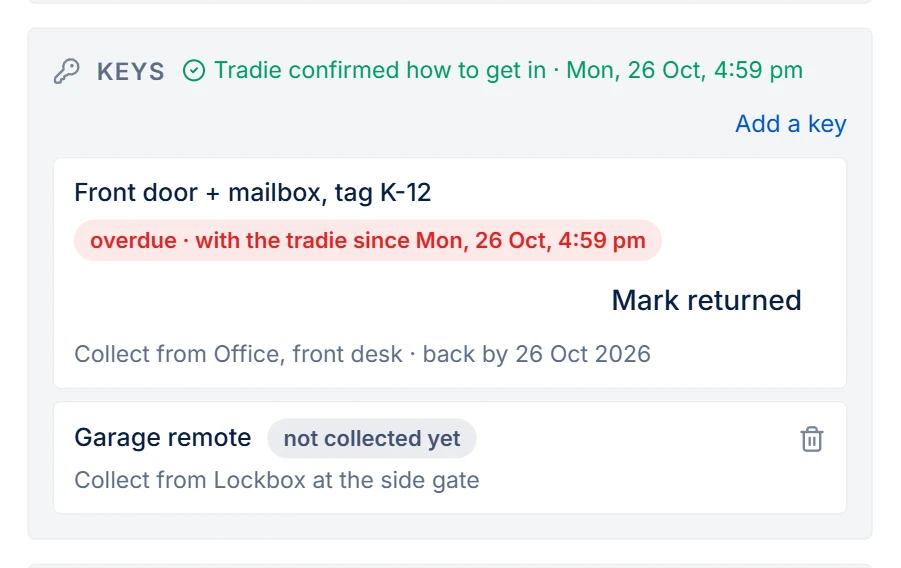
If a key is still out after its return date, or a day after the tradie marked the work done when you set no date, you get one notification: Key not returned — Front door + mailbox, tag K-12, 12 Ocean St. When the key is back at the office, click Mark returned. A key the tradie has collected is never deleted, only marked returned, so the job always shows who had it and when.
💡 Real-life example: The locksmith needs the key to 45 Bourke St on Tuesday. Sarah adds "Front door, tag K-12, collect from the office, back by Wednesday". The locksmith taps collected at 8:10 and returned at 15:40. On Thursday the owner asks who had the key: it's on the job.
Message a contractor on WhatsApp — without a work order
Most of what you say to a contractor isn't about one job: are you free Thursday, send me the invoice, the gate code changed. Every contractor card has a WhatsApp box. Type, send, and the message goes from your agency's WhatsApp number. Their replies come back into the same box (and into your notifications as WhatsApp from Doha Rapid Plumbing) — they never land in the tenant inbox, because PMFriend recognises the sender by the mobile number on their card.
Two things to know:
- WhatsApp only lets a business send free-form messages to someone who wrote to the number in the last 24 hours. If the contractor hasn't messaged you today, the send shows in red as not delivered with the reason — ask them to send you a quick "hi" first, and it works from then on.
- The contractor needs a mobile number on their card. No number, no box.
What happens after the job
The contractor uses the same magic link to:
- Mark the job complete
- Enter their final cost
- Add notes (e.g. "replaced inlet hose, advised tenant to run dishwasher empty cycle once a week")
That marks the work order complete in your dashboard. If the job relates to a compliance task, the compliance task auto-completes too, and the task shows the job: who did it, their note and the final cost they entered. The price can be typed the way people write it, such as "1,500", "QAR 325" or in Arabic digits. If the page can't read it, it asks again rather than dropping it.
The tenant is then asked whether it actually got fixed (one digit on WhatsApp, one tap in the email). A "not fixed" lands in your Attention Inbox and counts against the contractor's track record — so the ranked picker learns from outcomes, not just from who's on the list.
Going deeper
Work photos and gate passes
- Before/after photos from the contractor. The job page has an "Add photos" button — the contractor photographs the finished work, and the photos appear on the work order in PMFriend. You (and the owner) see exactly what the invoice bought, without a follow-up site visit. If they tap Mark work done without having added one, the page asks for a photo of the finished work first (one tap opens the camera). They can still skip it — nobody gets stuck on a job because the upload failed — but most won't.
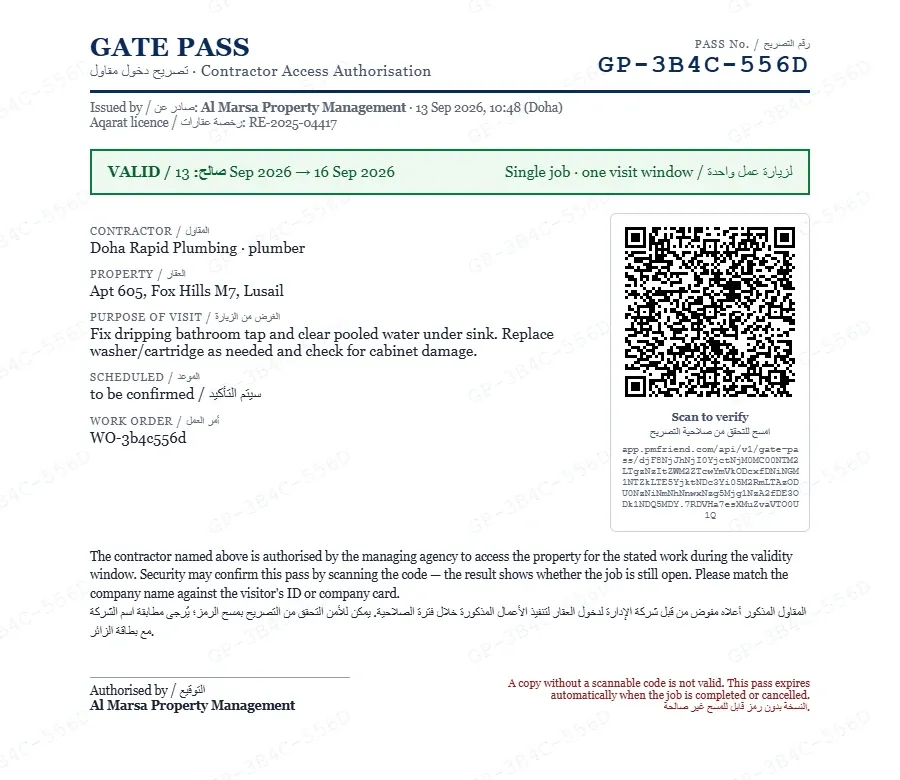
- One-click gate-pass letter. Towers and compounds (West Bay, The Pearl) ask for an agency authorisation letter before letting a contractor in. Every dispatched work order has a "Gate-pass letter" button that produces a printable, bilingual English/Arabic access authorisation — contractor, property, purpose, schedule, your agency details and Aqarat licence — ready for building security.
- Give it to the contractor with the job — your call. When you dispatch, tick Include gate-pass letter and the contractor's job page gets a "Gate-pass letter for building security" button they can show on their phone; the WhatsApp link message carries it too. It sits in the Getting in section with the visit time, the tenant's phone and the access note — it is about the contractor reaching the flat. Didn't tick it and security asks anyway? Tick Gate pass → On the contractor's job page under Getting in at any time, then Send on WhatsApp again. Untick it and the button disappears from their page.
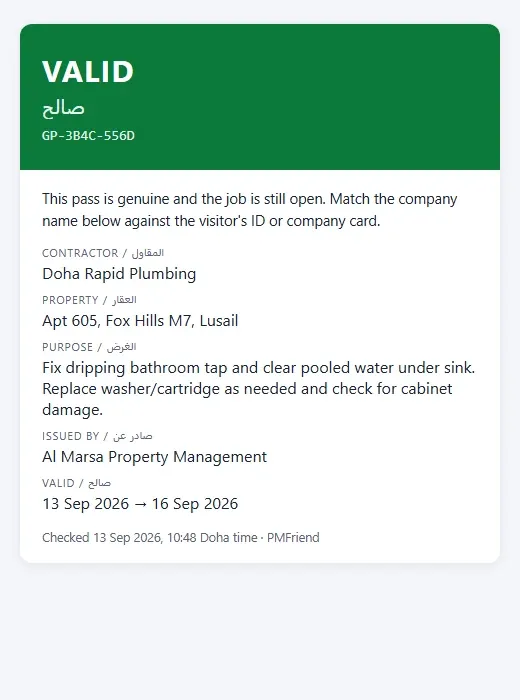
- Every pass is unique and checkable. The letter carries a pass number (also as a faint watermark across the page), a validity window (three days around the scheduled visit, or until you close the job — whichever comes first), and a QR code. Security scans it with any phone and sees, in English and Arabic, VALID, EXPIRED, or NO LONGER VALID — the last one the moment you complete or cancel the job — together with the company name to match against the visitor's ID. A photocopy without a scannable code is not a pass; a letter from last month stops working by itself. Nothing to revoke, nothing to phone in.