Inspection reports
Writing up an inspection report takes ~45 minutes; reviewing an AI draft takes ~10. At 20 inspections a month that's ~12 staff-hours back — and reports go out the same day, not at the end of the week. Indicative figures; every portfolio differs.
Quarterly inspections are the single biggest "this drains my whole afternoon" task in residential PM. PMFriend's inspection report writer saves 4–6 hours a week per PM.
Every inspection is saved — the rooms, your notes, the photos and the report — so you have a history per property. And the records that decide a deposit (move-in, move-out, bond-out) go to each tenant on the lease to agree or dispute, so the condition is settled at the start of the tenancy instead of argued about at the end.
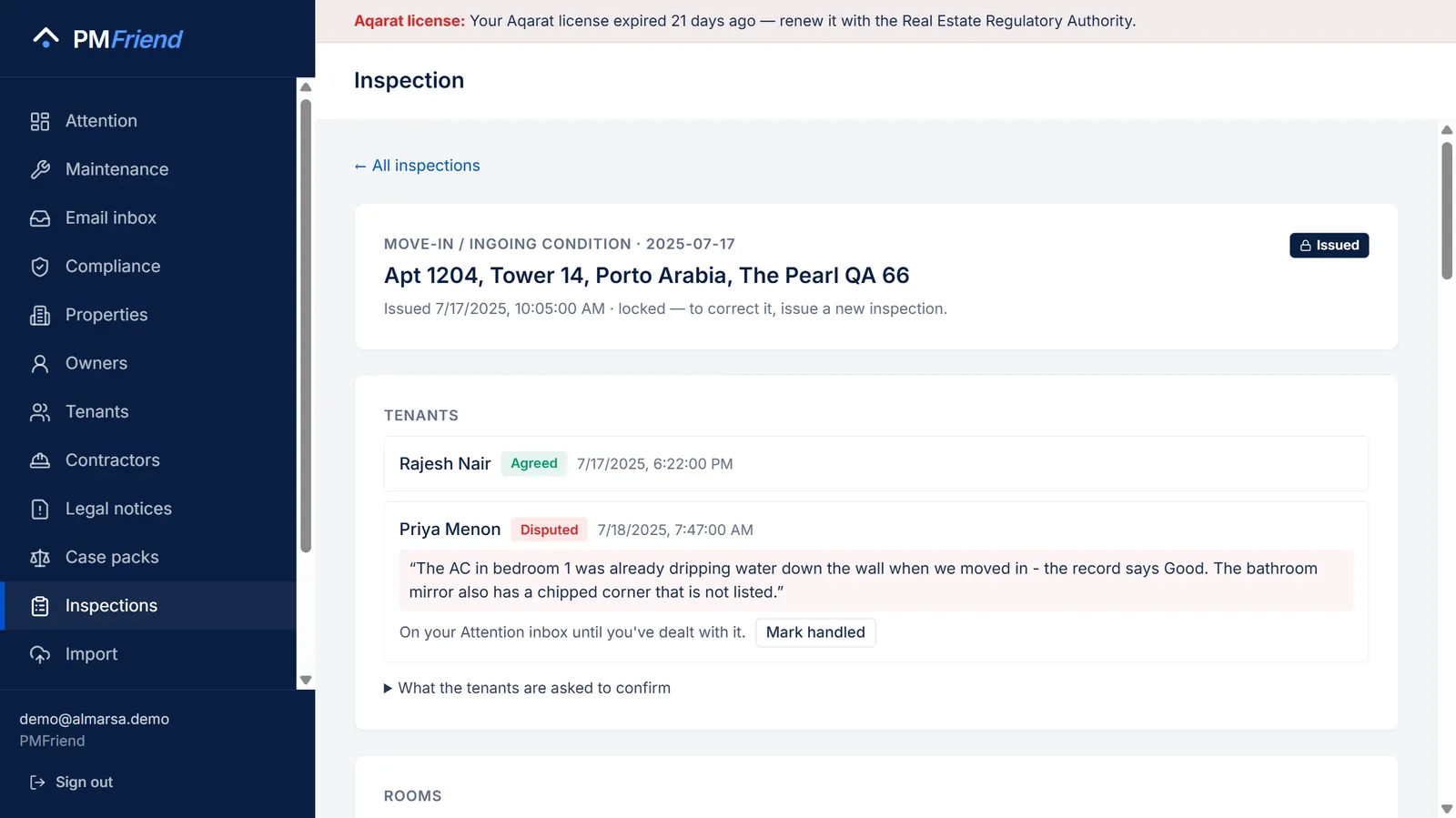 Where to find it: sidebar → Inspections. Start one, tick rooms and add photos on site, let the report write itself, then issue it.
The before-and-after
Before PMFriend
Sarah does the inspection at 23 Beach Rd at 10am Wednesday. Walks through with her phone, snaps a few photos, jots notes. Back in the car, she opens an old report template, deletes the previous tenant's name, retypes the property address, copies her notes from WhatsApp into the right sections. Spends 35 minutes turning notes into a coherent report. Time per inspection: ~50 minutes.
After PMFriend
Sarah opens Inspections on her phone before she arrives, picks the property and the type, and clicks Start inspection — the standard checklist is already there. As she walks the property she switches items to Fair / Poor where she sees an issue, adds a 5-word note and a photo. Back in the car she clicks Write report. PMFriend writes a 1.5-page prose report in seconds. She edits two phrases and clicks Issue. Time per inspection: ~12 minutes total.
How the checklist works
PMFriend ships with a sensible default of 6 rooms × 4-7 items each:
- Entry / hallway — Walls, Floor, Door + lock, Lighting, Smoke alarm
- Living room — Walls, Floor, Windows, Lighting, Power points
- Kitchen — Walls, Floor, Oven, Cooktop, Range hood, Sink, Cupboards
- Bathroom — Walls/tiles, Floor, Shower, Toilet, Vanity, Exhaust fan
- Bedroom 1 — Walls, Floor, Windows, Wardrobe, Smoke alarm
- Outdoor — Lawn, Fences, Gutters, Pathways
Properties in Qatar get the items every Gulf move-out argues about: the air conditioning in the living room/majlis and each bedroom, the water heater, and a balcony instead of a garden.
A move-out starts from the move-in. Choose Move-out and PMFriend opens the last issued move-in record for that property — same rooms, same items, with what was noted then. You only change what is different now, and every item where something was noted at move-in (or has changed since) shows At move-in: Fair — hinge loose beside it.
Every item starts at Good. You only touch the items where you see something. The default is "fine, fine, fine" — the AI turns that into prose without making it sound robotic.
You can:
- Add or rename rooms
- Add items inside a room
- Set conditions: Good / Fair / Poor / N/A
- Add per-item notes
- Add per-room general notes
- Add an overall comment at the bottom
- Add photos to each room (up to 40 per inspection)
- Save the draft and come back to it later
What the AI writes
Once you click Draft report, the AI produces:
- A multi-paragraph prose report — organised by room, in AU English. Reads like something a real PM would write.
- Safety flags — automatically extracted: smoke alarms, gas, electrical, structural, mould.
- Follow-ups — every item marked POOR becomes an imperative sentence ("Replace range-hood filter in kitchen").
- A sworn-by sign-off block — your name + agency, formatted the way tribunals expect.
Real example
You walk into a property and find:
- Range hood filter saturated (kitchen, range hood — POOR)
- Mould on shower grout (bathroom, shower — FAIR — "minor")
- Light wear on living room carpet (FAIR — "under coffee table")
You hit Draft report. The AI writes:
Routine quarterly inspection — 23 Beach Rd, Brighton VIC 3186
27 April 2026. Conducted by Sarah Lee, Smith & Co Property Group.
The property at 23 Beach Rd was inspected on Wednesday 27 April 2026. Overall presentation is good and the tenants — Mei Chen and family — continue to maintain the property respectfully.
The kitchen is generally well-maintained, though the range-hood filter is saturated and should be replaced before the next inspection. The bathroom is in fair condition; minor mould has developed along the shower grout — we will remind the tenant to clean weekly...
Safety flags: Smoke alarms tested, all operational. Follow-ups: (1) Replace range-hood filter in kitchen.
About 8 seconds end-to-end.
Issuing a record — and the tenant confirms it
When the report reads right, click Issue. From that moment the record is locked: the rooms, the photos and the report can no longer be changed by anyone, including you. If something needs correcting, you start a new inspection. That is what makes the record worth something in a dispute.
For a move-in, move-out or bond-out record, each tenant on the lease gets their own link by e-mail (and WhatsApp where possible). They see every room, your notes and the photos, and choose:
- I agree — the record reflects the flat on that date, or
- I dispute it — and say, in their own words, what is wrong or missing.
Their first answer is final and is kept with the record. A dispute lands on your Attention inbox with the tenant's words and stays there until you click Mark handled on the record — after you've called them, issued a corrected record, or decided it stands. On the inspection you see where each tenant stands — Agreed, Disputed (with their reason), Waiting, or No e-mail or mobile — and in the list, "2 of 3 agreed". A tenant who hasn't answered can be sent a new link; the old one stops working. Flatmates each answer for themselves — one tenant cannot agree on behalf of another.
What the tenant is asked to confirm is shown on the record: it reflects the condition of the property on that date, the record is between them and your agency, and PMFriend only provides the software. It is not a legal certificate and does not replace your tenancy's own condition-report rules.
Routine inspections are saved and locked the same way, but nobody is asked to confirm them.
Photos
Add photos to each room while the inspection is a draft. They are stored with the record, shown to the tenant on their link, and locked with the rest when you issue. The AI does not look at the photos yet — it writes from your checklist and notes.