Maintenance & repairs
A PM handles roughly 40 requests a month per 100 doors. Reading, classifying, and deciding urgency manually takes ~10 minutes each; AI triage cuts that to ~2. That's ~5 staff-hours a month per 100 doors back (over $2,000/yr at $35/hr) — and a genuine emergency surfaces in seconds instead of sitting in a queue. Indicative figures; every portfolio differs.
The single biggest time-drain in residential property management is maintenance. PMFriend turns that into a clean assembly line.
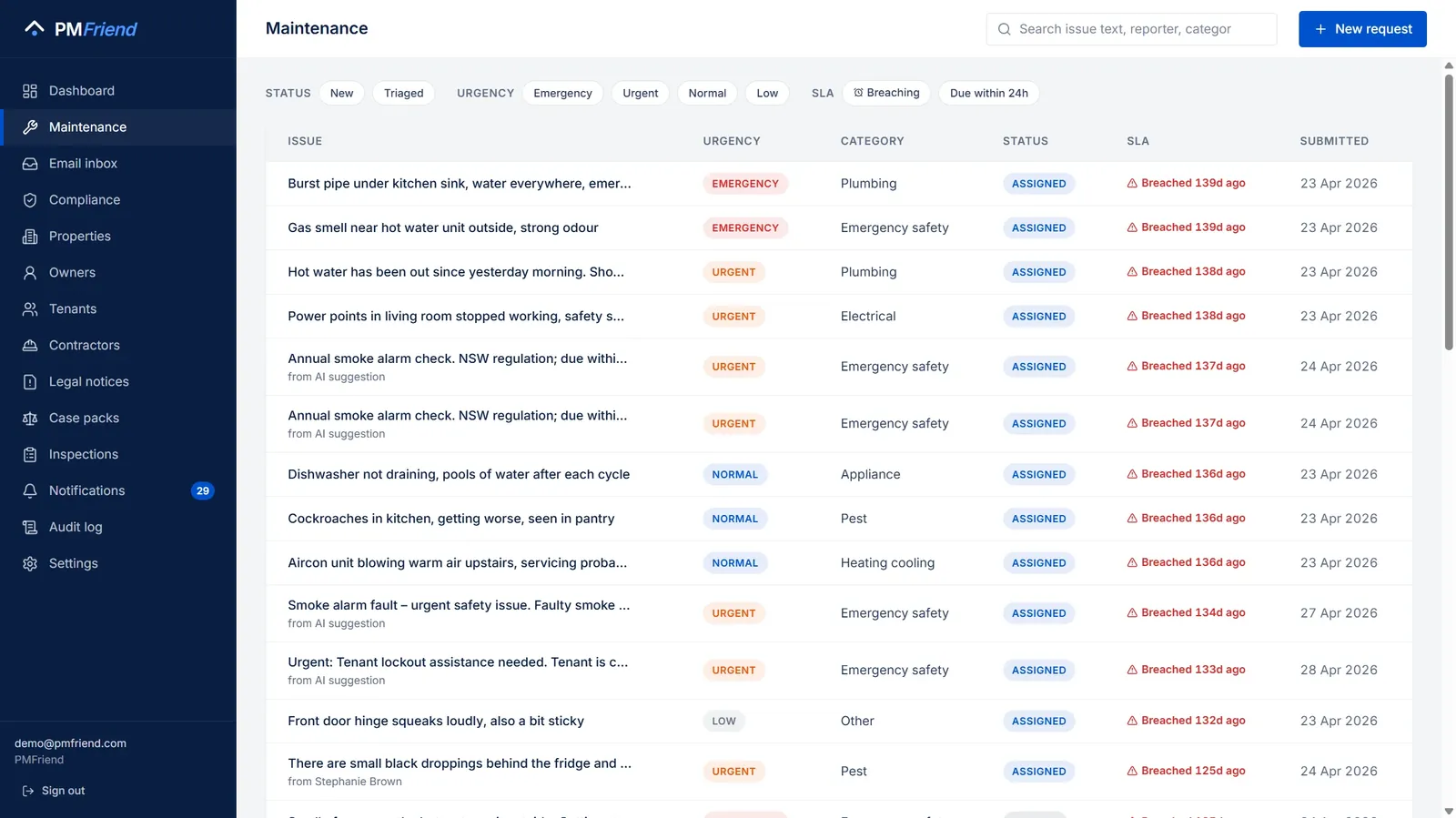 Where to find it: sidebar → Maintenance. Filters across the top; anything breaching its SLA is flagged in red.
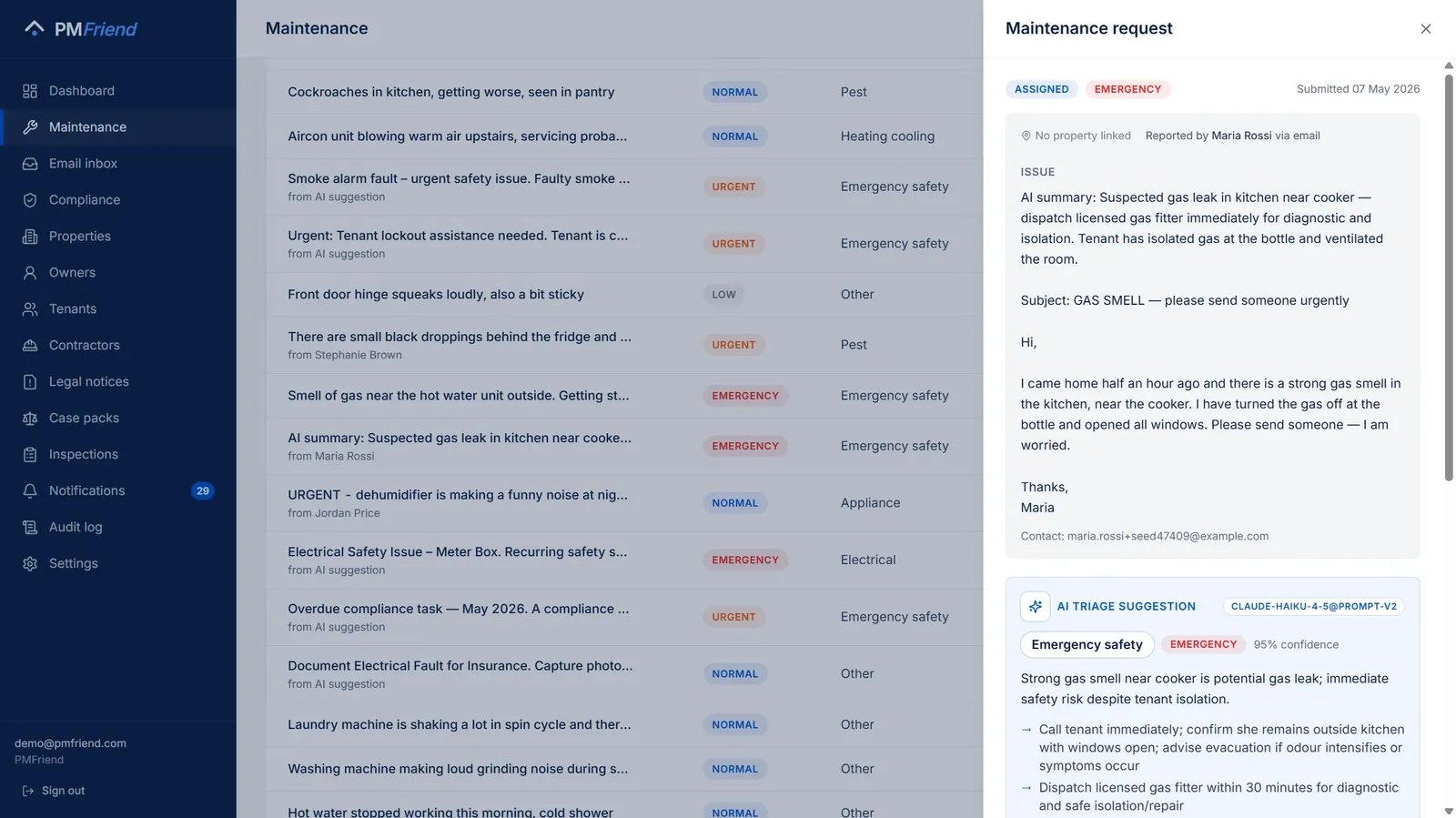 Click any row: the original tenant message on top, the AI's read underneath — category, urgency, confidence, and concrete next steps. The PM stays in charge; the AI just did the first pass.
The before-and-after
Before PMFriend
Tenant texts you a photo of a leaking dishwasher. You read it on the bus, plan to action it later. You forget. The tenant texts again two days later, less polite this time. You call three plumbers. Two don't answer. The third can come Friday. You text the tenant. The owner texts you asking what's happening. You'd forgotten to tell them. The plumber arrives, the cost is over your owner's threshold, the owner needs to approve it, you have to chase that. Time spent: ~2 hours scattered across 4 days.
After PMFriend
Tenant submits the issue via the report page (link on the fridge sticker). It lands in the maintenance inbox with a photo. AI suggests "Plumbing / Urgent" — you accept in one click. Three plumbers ranked by relevance — you pick Watertight. AI drafts the work-order scope; you bump the budget ceiling; click Send. Plumber gets a magic-link, accepts, books in. Tenant + owner both see status updates automatically. Friday afternoon: it's fixed. Time spent: ~8 minutes total.
What the AI does for maintenance
When a maintenance request lands, PMFriend's AI suggests four things in about two seconds:
- Category — Plumbing, Electrical, Appliance, Structural, Pest, Cleaning, Smoke alarm, Pool, Other.
- Urgency — Emergency / Urgent / Normal / Low.
- Likely causes — short list typical for AU rentals.
- Suggested actions — 2-3 next steps the PM should take.
💡 Real-life example: Tenant submits "water under the kitchen sink, dripping when I run the tap". The AI suggests Plumbing / Urgent, lists likely causes (loose drain trap, cracked S-bend, failed cold-water inlet), and suggests "1) ask tenant to place a bucket and not run the tap, 2) dispatch plumber within 24h".
You can accept, edit any field, or override entirely. Once you apply it, the request stays open and moves you straight to the next step, the work order.
Applied the wrong category or urgency? Until a work order exists you can still fix it: the SLA card shows Triaged as … · Change triage, and Resuggest and Apply suggestion stay on the AI card. A correction never restarts the clock (the SLA still counts from the first triage, so raising a Normal to Urgent a day later can make it overdue straight away, which is the truth), and the tenant does not get a second "we have your request" message. Once a work order exists, the triage is fixed.
If a button seems to do nothing, the panel now says why. The usual case on the public sandbox: it resets every six hours, and a request created after the last reset disappears with it. Close the panel and open the request again from the list.
Not convinced? Ask again — it thinks harder. If the first suggestion doesn't look right, click Resuggest: the second opinion automatically runs on a stronger AI model. You'll see which model produced the current suggestion right on the card.
How tenants submit
Three channels, all flowing into the same inbox:
- The web form —
pmfriend.com/r/<token>link on a fridge sticker. No login. Tenants can attach up to 3 photos. - The tenant app — coming soon.
- Manually by the PM — tenant called, PM types it in.
Photos help the AI
When a tenant attaches a photo on the web form, the AI reads it alongside the text. A vague report like "there's a leak in the bathroom" becomes a confident triage decision once the AI can see whether the photo shows a slow drip or a flooded floor. Photos appear as a thumbnail strip in the inbox so you can verify at a glance before dispatching.
Finding a job later
The queue sorts by latest activity, not by the date the tenant wrote in — a job completed this morning sits at the top even if the report came in weeks ago. Once a request has a work order, its status chip shows the job's real state (Completed, In progress, Awaiting owner), and the Work filters — In progress / Completed — narrow the list to open or finished jobs. Clicking a notification about a work order opens the request it belongs to, with the work order card inside.
SLA tracking
Once triaged, PMFriend starts an SLA clock based on urgency:
- Emergency — 2 hours, round the clock
- Urgent — 24 hours, round the clock
- Normal — 3 days, not counting the weekend
- Low — 7 days, not counting the weekend
"The weekend" is your agency's: Friday and Saturday for agencies in Qatar, Saturday and Sunday in Australia, in local time. A dripping tap reported in Doha on Thursday morning is due on Tuesday morning, not on Sunday — nobody's SLA breaks because the office was closed. Burst pipes and a dead AC in July don't wait for Sunday, so Emergency and Urgent keep counting. Public holidays are not taken off yet.
The dashboard shows breached / about-to-breach / on-track. Sort and filter the list by SLA bucket.
After hours: the PM on call
An emergency at 2 a.m. shouldn't wait for the morning inbox. In Settings → After hours and on call set:
- your office hours (or keep the usual ones for your market: Monday to Friday 08:30–17:30 in Australia, Sunday to Thursday 08:00–17:00 in the Gulf, on your own clock);
- who is on call, and a backup;
- whether urgent requests (no hot water, a broken lock) should wake them too, or only emergencies.
Outside office hours, a new emergency goes to the PM on call as a phone notification with I'm on it. If nobody takes it within 15 minutes, the backup gets it, and your emergency WhatsApp number too. After 30 minutes, everyone in the agency is told nobody has it yet. The first I'm on it stops it, and the team sees who has it. In office hours nothing changes. The person on call needs notifications turned on on their phone (Settings → Notifications on this device).
Planned maintenance: the jobs that come round every year
Some jobs aren't reported by anyone: the AC service before summer, the gutters before winter, the hot water check, the water tanks every six months. In Planned maintenance (left menu) add a plan once:
- what the tradie does, and how often: every year in a given month (the AC service in October), or every few months counted from the last time;
- which properties: every property, every property of a type (houses, for the gutters), or every property with an asset of a type (every property with air conditioning, split or ducted). For assets it's one job per property, listing all its units;
- optionally, the usual tradie and the price per job.
There are ready-made plans to start from: in Australia the AC service in October, the gutter clean in April and the hot water check; in the Gulf the AC service in March, the chiller service in April and the water tank cleaning every six months. A plan is saved switched off, so you can check the list of properties and their next due dates first.
Three weeks before the due date (you can change that), PMFriend raises the job at each property as a draft work order with the plan's scope and price, and tells you once: "AC service before summer: 14 jobs ready to send." You send them as usual, one by one, or all at once with Send to {the usual tradie}. Each tradie gets the job link on WhatsApp, and a job over the owner's approval limit goes to the owner first, as for any job. The request says planned where others say e-mail or WhatsApp, so it isn't mistaken for a tenant's report.
Each property's job is raised once per due date. Next year's is counted from this one, so a job you cancel ("the owner does it himself") is skipped for this round, not raised again tomorrow. Removing a plan stops new jobs; the ones it raised stay, as ordinary work orders.
Duplicate detection
When the same problem's reported twice (often phone + web form), the AI flags potential duplicates so you don't dispatch two plumbers.
💡 Real-life example: Tenant calls Sarah at 9am about a faulty oven. Sarah types it in. At 10am the same tenant submits via the web form because they're worried Sarah forgot. PMFriend recognises the duplicate and shows Sarah the link rather than spawning a new ticket.
One-click contractor dispatch
PMFriend ranks your contractors by:
- Trade match
- Insurance status (expired = pushed to bottom)
- ⭐ Preferred flag
- Track record — how often their jobs came back "not fixed", and how fast they finish (see below)
Pick one, the AI drafts a scope, you set a cost ceiling, decide whether the contractor gets the gate-pass letter with the job, and decide how they get in — share the tenant's number so they can call, or enter the visit window you already agreed with the tenant, or both (see Getting in). Hit Send. The contractor's page shows the address (with a map), the scope, the schedule and whatever you decided about access. Need the link again later? The work-order card has New link and Send on WhatsApp for as long as the job is open — see Contractors.
Which thing broke? — assets
Every request can be linked to the physical asset it's about — the AC split in the master bedroom, the tower chiller, lift #2 — picked from the property's asset list right in the request drawer (or created there). The job inherits the link. That's what lets PMFriend say "same AC had a completed job 12 days ago" before you dispatch the same plumber again. See Operational memory.
The tenant's tracking link — "is anything happening?" without a phone call
Every request gets one link, for its whole life. The tenant sees it on the confirmation when they report on the web form, and it is in every message they get afterwards — the acknowledgement, "contractor assigned", "work done". Open it and there is a parcel-style timeline: reported → reviewed → being arranged → contractor assigned (the company's name) → visit scheduled (the day and time) → work under way → waiting for you to confirm → completed. Steps done are ticked, the current one is highlighted, the rest are greyed out.
Deliberately, no dates on the steps — a date next to "reviewed" is an argument waiting to happen. The only time on the page is the scheduled visit, because a tenant who cannot see when the contractor is coming has to ring the office. The page never shows cost, the contractor's phone number, the owner's decision, your notes or anyone else's request.
Under Your report the tenant sees their own words, in the language they wrote in: for a request you made from a WhatsApp or e-mail message, that is what they sent before you made it a request — not the AI summary and not your replies. If you deleted that message from the inbox, the page leaves the block out rather than show anything that is not theirs. A request from the web form, or one you logged yourself, shows its description as written, so write it as you would say it to the tenant.
Once the visit is booked, the tenant can tap Add to calendar — Google Calendar, or Apple Calendar / Outlook — so the reminder is on their phone and they are home when the contractor arrives. If the time changes, the page offers the new one.
When the job is waiting for the tenant, the fixed / not fixed buttons are on this page too, so the tenant who missed the WhatsApp still closes the job. In Arabic (and Urdu) the page reads right to left.
You can copy the tenant's link from the work order — Links → Tenant → Copy link — if you want to send it yourself. It is the same URL every time.
Did it get fixed? — the tenant closes the job
When a contractor marks the work done, the job is not closed yet. It waits — the status reads Awaiting tenant OK — and the tenant hears about it automatically and is asked one question:
- On WhatsApp: the completion message ends with "Reply 1 if the problem is fixed, or 2 if it is not" — in the tenant's own language. They type one digit. Anything they add after it ("2 still dripping at night") is kept as their comment.
- By email: two buttons — Yes, it's fixed / No, still not fixed. One tap, no login, no form.
If the tenant rings reception instead, the PM can record the answer on the work order with the same effect.
A "fixed" closes the job — that is the moment it becomes Completed, and the record says the tenant closed it. A "not fixed" sends the job back to the contractor: it returns to In progress, the contractor gets a fresh job link on WhatsApp with the tenant's words, it flags the work order in red, and it puts "Tenant says it's not fixed" at the top of your Attention Inbox until someone deals with it. When the contractor marks it done again, the tenant is asked again.
If the tenant says nothing, the job closes on its own after a number of days you set in Settings (7 by default; 0 means it waits until someone closes it). A job closed that way is marked no reply from the tenant — it is never shown to an owner as "the tenant confirmed".
If you need to close it yourself — the tenant confirmed by phone, the unit is vacant — the work order has a Close without tenant confirmation button. It asks for a reason, and the job is marked as closed by you. Two timestamps are kept apart on purpose: when the contractor finished the work, and when the job was closed. Contractor track records use the first; owner spend uses the second — so a slow tenant never counts against a fast contractor.
A "not fixed" on a job that was already closed (a late complaint) does not reopen it; it flags it for you the same way, and the record of what was done and what it cost doesn't change.
The answers don't disappear. Every "not fixed" counts against the contractor in the ranked picker, so the plumber whose jobs keep coming back drifts down the list — with the reason written on the chip ("2 of 4 jobs reported not fixed"). That's the point of keeping the history: next time you dispatch, the system remembers what you'd otherwise have to.
Where do jobs get stuck?
PMFriend keeps a history of every job's stages — draft, waiting for the owner, dispatched, scheduled, in progress, completed — with the date each one started. A principal can ask the connected AI assistant "where do our jobs get stuck?" and get the typical days per stage and the jobs waiting longest. This is available only through the assistant, not on screen in the app. See Ask your portfolio anything.
What stays in your PMS
PMFriend handles the workflow. Trust accounting, owner statements and the statutory records your state's agents legislation requires all stay in PropertyMe / PropertyTree / Console.