Ask your portfolio anything
The questions a principal or CFO actually asks — "what did we spend on maintenance this quarter?", "which buildings are dragging our SLA down?", "is anything overdue that could bite us?" — usually mean someone spends an hour exporting and cross-referencing spreadsheets, per question. Connected to ChatGPT or Claude, the answer takes one sentence, and the follow-up ("break that down by month, plot it") takes another. The numbers come straight from the live system, not from a stale export. Indicative figures; every portfolio differs.
The difference in one line: your PMS's connector knows what's in your PMS. Ours knows whether the repair held — and what's failing for the second time. The tenant's "fixed / not fixed", each tradie's not-fixed rate, repeat failures per asset and where jobs wait are data only PMFriend records, so only PMFriend's connector can answer them.
Make changes from the chat, with a person approving
Since 26 October 2026 Claude or ChatGPT can also propose changes:
- "Log a leak at 14 Rathdowne St";
- "Book the smoke-alarm check at Carlton North";
- "Set access on that job: the agency arranged Thursday 8 to 12";
- "Assign Harbour Plumbing to WO-1a2b3c4d";
- "The tenant says it's fixed".
Nothing changes on the first answer. The assistant shows you a proposal: what will happen, with full names and dates, and anything else it triggers (for example "Harbour Plumbing gets the job link"). Then:
- You say yes in the chat, if you allowed "Confirm changes from the chat" when you connected. This is for your own internal changes, such as logging a request, booking a compliance task or setting access.
- Or someone approves it in PMFriend: it appears at the top of the Attention page under Proposed by assistants, with Approve and Reject.
- Assigning a contractor and recording a tenant's answer always need an agency admin, because they reach people outside the agency.
The change is made exactly as if you clicked it in PMFriend, and the history says it came from the assistant and who approved it. A proposal nobody approves lapses after 24 hours.
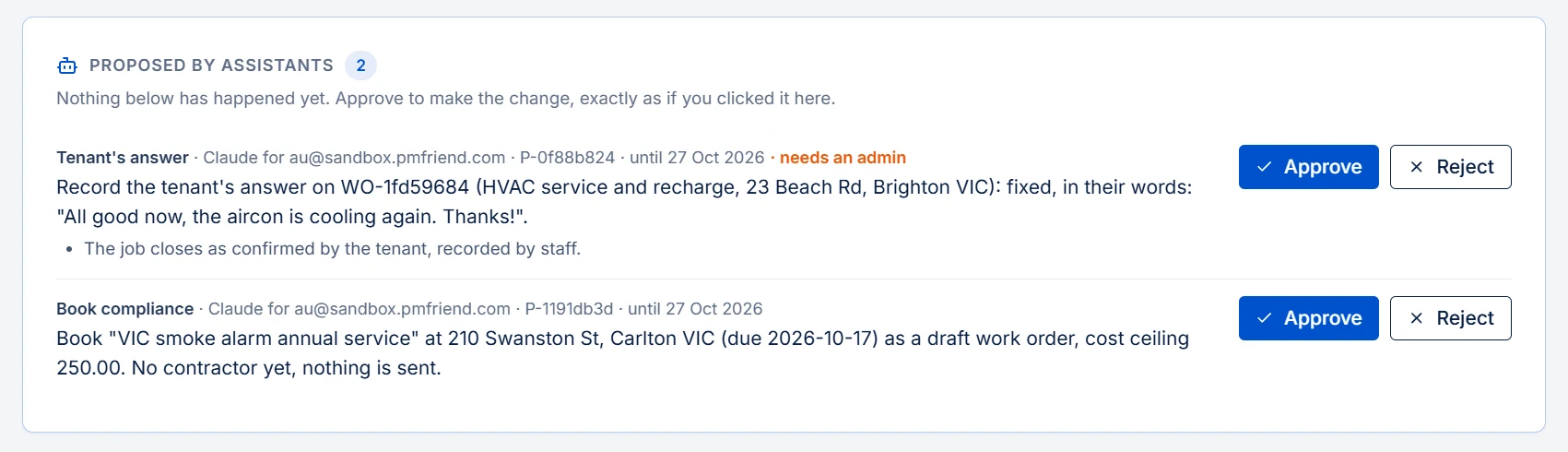 Where to find it: the top of the Attention page, only while something waits for a decision.
Who can do what:
-
Connecting: any PM or admin can connect their own assistant. On the consent screen, "Propose changes" and "Confirm changes from the chat" are off unless you tick them.
-
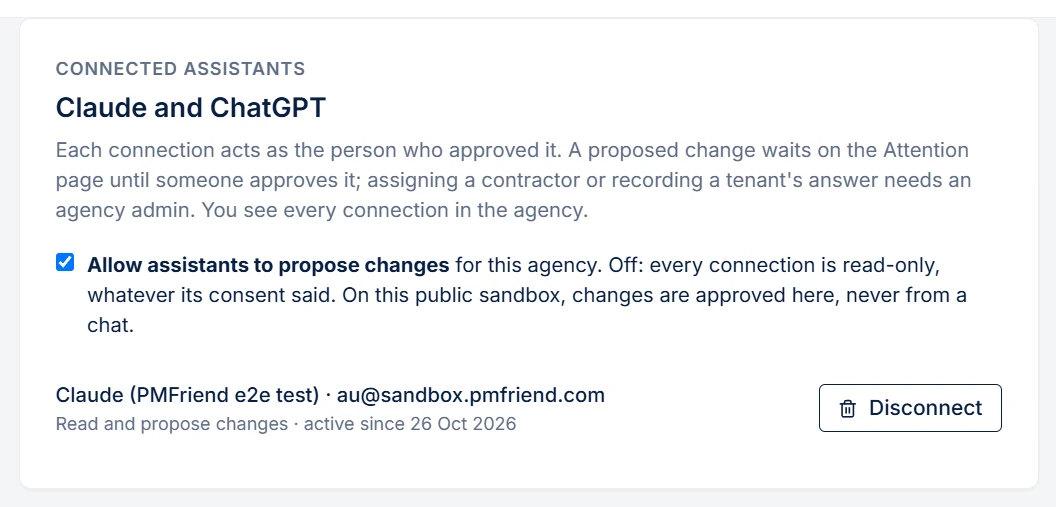
Disconnecting: Settings → Reporting API → Connected assistants lists each connection with its permissions, and disconnects it at once.
-
Switching off: an admin can switch assistant changes off for the whole agency. Reading still works.
-
What is never possible from a chat: deleting anything, money, users, settings, or sending messages.
-
On the public sandbox you can try proposals; they are approved on the Attention page.
It works the same for Australian and Qatar agencies.
PMFriend can hand your AI assistant a read-only window onto your own portfolio. You add one URL to ChatGPT or Claude as a "custom connector", and from then on you can ask, in plain language:
- "Which properties have overdue compliance right now, and how overdue?"
- "Show maintenance volume by category for the last 90 days — anything unusual?"
- "List the requests that are past their SLA — which, where, and how many hours over?"
- "Show the rent roll — what's the monthly total, and which property pays most?"
- "What happened to each work order this year — status, contractor, cost?"
- "What needs my attention right now?"
- "Give me the full picture of Villa 18 — lease, maintenance, compliance, charges."
- "Work-order spend by month for the past year. Plot it."
- "Any lease ending in the next 90 days?"
- "Which service-charge categories jumped more than 15% year-on-year?"
- (Qatar) "Is any lease missing its Arabic contract version?"
The assistant pulls live numbers and does the analysis with you — comparisons, charts, "what should I worry about first".
See it in ChatGPT
One unedited-speed session in ChatGPT with the PMFriend connector: an executive overview with charts, contractors whose repairs keep coming back, overdue compliance, and the owner summary in Arabic (demo portfolio, no real tenants).
A real example
In one of the first live sessions, the connected AI noticed something we never built a report for: the portfolio's entire rent roll renewed in two waves within four months of 2027 — a renewal-concentration risk — and recommended starting renewal conversations 120–150 days out. It also cross-checked the rent-roll total by hand and matched it to the riyal. That's the point of this feature: an analyst that reads everything and tells you what you didn't think to ask.
Questions that work well
- "What needs my attention right now?"
- "Which contractor's repairs keep coming back?" — completed jobs, "not fixed" answers and median days per contractor over the last year
- "Where do our jobs get stuck?" — time in each status, see below
- "Chart the monthly rent roll by property."
- "Give me a one-page overview for the owner — then the same in Arabic."
Where do jobs get stuck? — time in each status
Every job moves through the same stages: Draft → Awaiting owner approval (when the cost is above the owner's limit) → Dispatched → Scheduled → In progress → Completed. PMFriend records the moment a job enters each stage, so your assistant can tell you where time actually goes.
What you can ask
- "Where do our jobs get stuck?" — for each stage, the typical (median) number of days jobs spent in it over the last 90 days, how many jobs are sitting in it right now, and the longest current wait.
- "Which open jobs have been waiting longest, and for what?" — the open jobs longest in their current stage, with the property, the contractor and the days spent in every stage so far.
- "How long did WO-1a2b3c4d sit in each status?" — one job's breakdown and its full history of stage changes, with dates. (Job numbers come from "list our work orders".)
- "Compare the last 30 days with the last 180." — any window up to two years.
How the time is counted
- A total per stage, never reset. If a job ever goes back to a stage it was in before, the new time is added to the earlier time instead of starting again from zero.
- The median covers jobs that have left the stage, so one job that has been waiting for a week doesn't distort "how long does dispatch usually take?" — it shows up separately as the longest current wait.
- Completed and cancelled jobs carry no time — they are the finish line.
- History is recorded from 15 September 2026. For older jobs PMFriend reconstructs what it can from the creation and completion dates, and says how many jobs that applies to.
Why it lives here and not in the app
These numbers describe your process — where approvals wait, where bookings slip. Shown next to every job in the app, they would read as a stopwatch on the people doing the work, so they are only available through your AI assistant, to whoever you've connected it for. The app itself doesn't display them.
What typically comes out of it: jobs waiting days for owner approval (raise the owner's approval limit for routine repairs, or chase earlier), or jobs dispatched quickly but slow to get a booked visit (a contractor conversation, not a team problem).
How to set it up (2 minutes)
- In ChatGPT or Claude: Settings → Connectors → Add custom connector →
enter
https://app.pmfriend.com/api/v1/mcpwith OAuth. - The client opens a PMFriend login — a PM or agency admin signs in and approves the consent screen. Reading is always included; tick "Propose changes" (and, if you like, "Confirm changes from the chat") only if you want the assistant to suggest changes.
- Ask your first question. (Clients without OAuth can instead use a key URL from Settings → Reporting API.)
The safety model (short version)
- Reading changes nothing. Reporting questions can only reach reporting queries. Changes exist only as proposals that a person approves (see above), and only for connections where "Propose changes" was ticked.
- Scoped to your agency. The key resolves to your agency and nothing else; the same row-level isolation that separates agencies everywhere applies here.
- No tenant personal data. Reports carry aggregates and property addresses — never tenant names, emails, or phone numbers.
- Tenant messages are treated as data, not commands. Reports quote short excerpts of what tenants and contractors wrote. The connector tells your assistant, with every such result, that this text is untrusted: it must report on it and never follow instructions hidden inside it. A proposal comes only from your own instruction, and every change waits for a person's yes, so such text cannot change anything in PMFriend.
- The URL is the credential. Treat it like a password: share it only with the person it's for, and revoke it in Settings the moment it's no longer needed. Revocation is immediate.
- Keys are stored the way passwords should be (only a cryptographic hash), and the endpoint is rate-limited.
See also
- How we count → — the definitions behind every number your assistant reports
- How the AI features handle data →
- Owner communications → — the push side of the same story: PMFriend writes the update; this is the pull side, where the owner asks.