Accounting export
Every job your contractors finish ends with a cost. Your accountant needs those costs as bills from the contractor, in your accounting system. The accounting export gives them that file, one row per bill, without anyone retyping a job.
Where to find it: Settings → Accounting export (admins).
What is in the file
One row per finished job that has a final cost and a contractor:
- the bill date: the day the contractor marked the work done, in your time zone;
- the due date: the bill date plus the days you choose (30 by default);
- the bill number: the job reference, for example
WO-3F2A9C1B, the same reference your helpdesk and webhooks see; - the supplier: the contractor's business name, CR / ABN number and e-mail;
- the property and building, and the job description;
- the expense account and tax code you type in once;
- the amount in your currency (QAR or AUD);
- whether the tenant confirmed the fix, or the job closed another way (no reply, closed by the property manager, nobody to ask).
Before you download, PMFriend shows how many bills the file holds, the total, and what was left out and why: finished jobs without a final cost, and jobs without a contractor. Add the cost on the job and it is in the next export.
By default only closed jobs go in. Tick Include jobs still waiting for the tenant's "fixed" to bill those too; the file says which ones are still waiting.
An example
Six bills from the demo agency, for October, as the export writes them. Download them to try an import before you export your own:
- Standard example (6 bills, CSV): QuickBooks, Zoho Books, Tally, NetSuite, Excel
- Xero example (6 bills, CSV): Xero's bills import template
The standard file, first columns:
| Bill date | Bill number | Supplier | Property | Description | Amount | Tenant confirmation |
|---|---|---|---|---|---|---|
| 2026-10-03 | WO-3F2A9C1B | Gulf Cooling Services | Apt 305, Al Sadd Residence | Replace AC capacitor, split unit in the master bedroom | 850.00 QAR | Confirmed by tenant |
| 2026-10-07 | WO-8B7C2D40 | Doha Rapid Plumbing | Villa 9, Al Waab Gardens | Clear blocked kitchen drain | 320.00 QAR | Confirmed by tenant |
| 2026-10-12 | WO-A41E6F02 | Pearl Plumbing & Drainage | Apt 305, Al Sadd Residence | Replace washing machine inlet hose | 275.00 QAR | No reply from tenant |
| 2026-10-15 | WO-C5D93E17 | Falcon Lift Services | Office 1402, Dafna Gate Business Tower | Lift 2 annual inspection and certificate | 1450.00 QAR | No tenant to ask |
| 2026-10-21 | WO-E2F04A28 | Northgate Fire & Safety | Block A, Al Waab Meadows International School | Repair fire door closer next to Classroom A4 | 610.00 QAR | Closed by property manager |
| 2026-10-28 | WO-F63B5C39 | Doha Rapid Plumbing | Villa 9, Al Waab Gardens | Fix leaking shower mixer | 190.00 QAR | Awaiting tenant |
The file also carries the due date (30 days here), the supplier's CR number and e-mail, the building, the expense account and tax code you typed, and the job status. All names in the example are fictional.
Two layouts
| Layout | For |
|---|---|
| Standard | QuickBooks Online, Zoho Books, Tally, NetSuite, or a plain spreadsheet. Opens in Excel with Arabic names intact. |
| Xero bills import template | Xero, column for column, dates day first. |
Importing it
PMFriend never pays anything in your accounting system. You import the file, and the bills arrive on your side for review.
- Xero: Purchases → Bills → Import, then upload the Xero layout. Use an account code from your chart of accounts and the tax rate exactly as Xero names it. Imported bills arrive as drafts.
- QuickBooks Online (Essentials, Plus, Advanced): Settings → Import data → Bills. Map the columns; QuickBooks requires the bill number, supplier, dates, account, amount and tax code, all of which are in the file. Intuit suggests at most 100 bills per import, so export a month at a time.
- Zoho Books: import bills from CSV and map the columns; the file is UTF-8.
- Tally (TallyPrime): open the file in Excel and save it as .xlsx, then import it with a mapping template for purchase vouchers (voucher date, supplier as the party ledger, the expense account as the expense ledger, the amount).
- NetSuite: the CSV Import Assistant can import vendor bills; map the columns once and save the mapping.
The exact menus depend on your edition and region. If an import asks for something the file does not have, write to us.
Direct connection (on request)
Instead of a file, PMFriend can create the same bills in your accounting system for you. The connect window offers these systems:
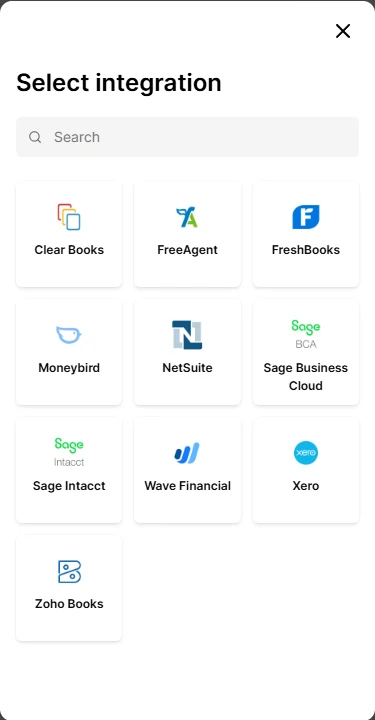
- Xero is tested end to end: the bills arrive under Purchases → Bills → Draft.
- Zoho Books, NetSuite, Sage Business Cloud, FreeAgent, FreshBooks, Wave, Clear Books and Moneybird connect the same way; we check the first bills with you when you connect.
- Sage Intacct and QuickBooks Online need our own app at Sage and Intuit first; until then, use the file.
Ask us to switch it on for your account; then, in Settings → Accounting export:
- Connect accounting system. A window from Merge.dev, the connection service we use, opens; choose your system and sign in there. PMFriend never sees your accounting password.
- Choose where the bills go: the expense account and the tax rate, picked from your own chart of accounts, and the days until a bill is due. Right after connecting, the chart can take a few minutes to appear.
- Send the bills. Pick the period as for the file; PMFriend shows how many bills are new, how many are already in your system and the total, then sends them.
What arrives on your side:
- one bill per job, from the contractor (an existing supplier with the same name or e-mail is used, otherwise one is added), with the job reference as the bill number, the description, the amount and the due date;
- in Xero as a draft for your accountant to approve; in systems without draft bills, as an unpaid bill to review. PMFriend never pays anything and never touches owners' money;
- the note says how the job was closed, for example "Confirmed by tenant".
Each job becomes one bill, never two. Sending the same month again only sends what is new. If your system refuses a bill (a closed period, a locked account), PMFriend shows the reason next to it; fix it there and press Try again. If a job's cost changes after its bill was sent, PMFriend tells you, and you correct that bill in your accounting system.
Disconnect at any time in the same place: the link is removed on Merge.dev's side too, and the bills already sent stay in your system. Tally has no such connection; use the file.
Good to know
- One file covers up to a year; a month at a time is easiest to reconcile.
- Only admins can export, and every export is recorded in the audit log.
- Owners' money and trust accounting stay in your property-management or accounting system. PMFriend sits beside it and never replaces it.
- The direct connection is switched on per account, on request. The file works with all five systems without it.