Unit turns
Every day a unit stands empty is a day's rent gone, and the day nobody remembers the cleaner is usually the day before the next tenant arrives. A turn puts the date, the jobs and the cleaning in one place, works out from your own tradies' speed whether you'll make it, warns you while there's still time, and shows what the empty days cost.
Unit 12B is empty from 1 December, and the next tenant moves in on 15 December. Between those two dates someone has to inspect the flat, get the defects fixed, book the cleaner and check the lot is done. That's a unit turn.
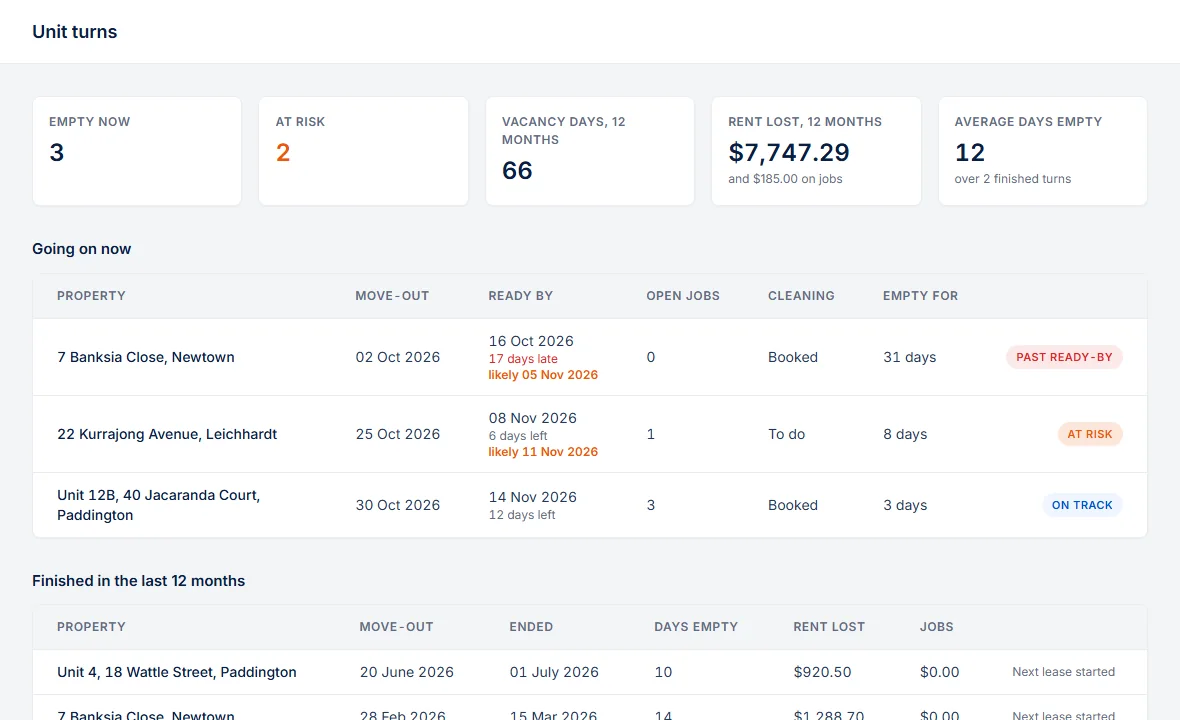 Where to find it: sidebar → Unit turns. The turn also shows at the top of the property's page while it is going on.
A move-out opens it
Record the move-out on the property's lease card and the turn opens. A new lease that replaces the current one moves that tenant out the day before it starts, so it opens a turn as well. Change the date and the turn follows. They're staying removes it: nobody moved out, so no vacancy happened.
The ready-by date
The date the unit has to be ready is worked out for you:
- The day before the next tenant moves in, when their lease is on file. Record the lease later and the date follows.
- Two weeks after the move-out, when no next tenant is on file yet.
- Your own date, with Change next to it. Automatic date goes back to the rule above.
It's never later than the day before the next tenant moves in, even if you chose a later date before their lease came.
What the turn shows
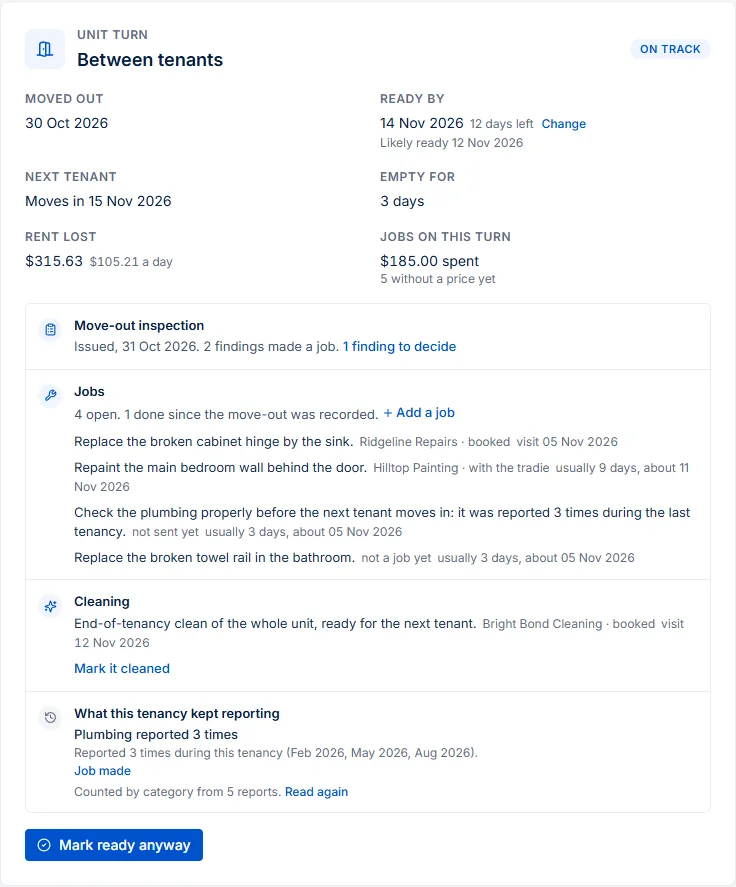
- The move-out inspection. Not started, with a link to start it; started and not issued; or issued, with how many findings made a job and how many you haven't decided yet. Findings become jobs on the inspection, as they always do.
- The jobs. Every job at the property a tradie hasn't finished, who has it and when they're coming, plus any request nobody has made a job of yet. A job waiting for the answer of the tenant who left doesn't hold the unit up. Add a job opens a new request on this property.
- The cleaning. Make it a job drafts an end-of-tenancy clean you send to a cleaner like any other job, and it's done when their work is done. Mark it cleaned is there when it's handled some other way, such as by the outgoing tenant.
- Deadlines. Open obligations from this tenancy and any others due by the ready-by date, such as a smoke-alarm check. They're for your information and don't hold the turn up.
- Days left and days empty. The days until the ready-by date, and the days nobody has lived there so far.
- Likely ready. The day the last open job is likely done: the booked visit where there is one, otherwise how long that tradie usually takes (usually 9 days, about 11 Nov). It needs three finished jobs from that tradie, or five across your agency for a job nobody has yet. With less to go on, it says nothing rather than guess.
- What it costs. The rent lost so far and per day, at the outgoing lease's rent, and the jobs: what's been spent and budgeted, and how many have no price yet.
- While it's empty. Obligations and maintenance plans due in the two months after the ready-by date, such as an AC service or a smoke-alarm check. Done now, there's no tenant to arrange around.
What this tenancy kept reporting
Read this tenancy goes through everything the tenant reported during their lease, in whatever language they wrote, and says what kept coming back: the hot water reported in February, May and August, or the fix the tenant said didn't hold. One click makes it a job, worded for the tradie, so the next tenant doesn't inherit it. One-off repairs aren't listed, and often the answer is that nothing came back.
It runs only when you click. The AI gets the reports with contact details removed, their dates and categories, and the suburb, never a name or the street, and nothing is sent to anyone. If the AI isn't available, PMFriend counts by category instead and says so.
Nothing is sent to anyone. Jobs go out when you send them, as usual, and the next tenant isn't told anything.
When it's at risk
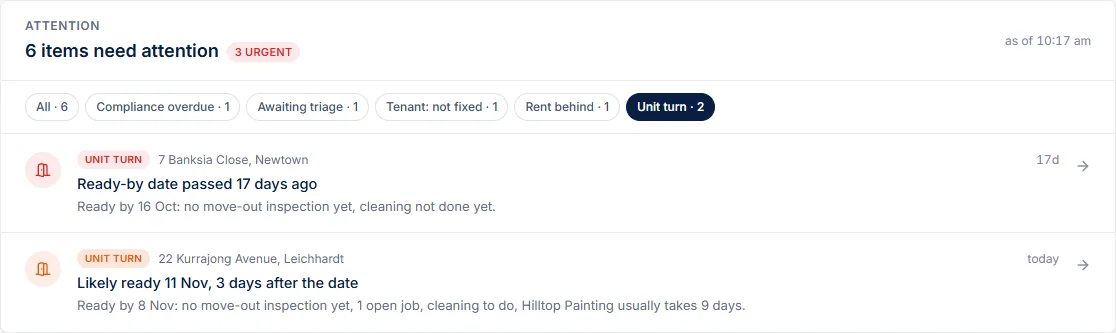
A turn shows on your Attention Inbox when:
- the ready-by date has passed and it isn't marked ready (urgent);
- 3 days or fewer are left and something is still open: no move-out inspection, findings to decide, an open job, or the cleaning (warning);
- a visit is booked after the ready-by date, however far away that is (warning);
- at your tradies' usual speed it will be late (Likely ready 11 Nov, 3 days after the date), which can show a week or more ahead, while you can still change something (warning);
- the cleaner is booked before the work is done, so they'd clean before the painter comes (warning).
The tradie knows the date
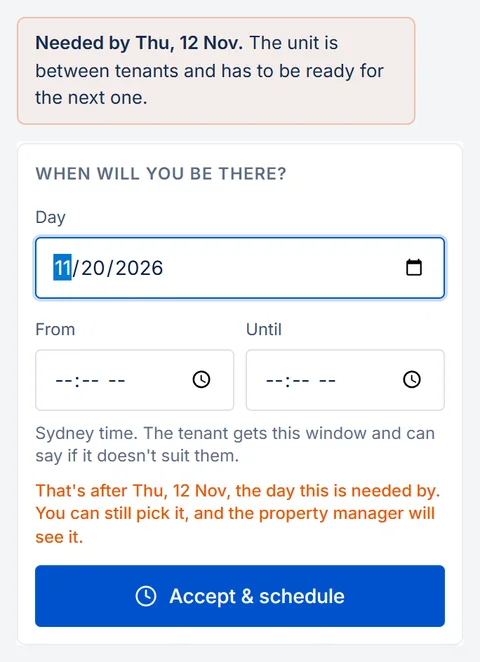
A job at a unit between tenants says when it's needed by on the tradie's own link, with no login: two days before the ready-by date, so the cleaner can come last, and the ready-by date for the cleaner. If they pick a later day, the page says so before they save. They can still pick it, and you see it on the turn.
Ready, and how it ends
Mark ready when the unit is ready. It says Mark ready anyway if something is still open, and that's your call. It stops the warnings, and Not ready after all takes it back.
The turn ends by itself on the day the next lease starts. If the next tenant moves in without a lease in PMFriend, or the unit is no longer for rent, Close this turn takes the day it stopped being empty. A property you archive leaves the page and the warnings.
Vacancy days
The Unit turns page adds up the last 12 months:
- Empty now: units nobody lives in today.
- Vacancy days: the days nobody lived there, across the portfolio.
- Rent lost: those days at each outgoing lease's rent, and what the jobs on those turns cost.
- Average days empty: per turn that finished in that time, with each finished turn listed below.
Your director can ask ChatGPT or Claude "how many vacancy days did we have this year, what did they cost, and which units won't be ready in time?" through the portfolio connector, and the turns are in your data export. How we count →
For Qatar
The same turn, on Doha's clock, with rent and costs in QAR. The deposit deadline from the move-out (14 days) sits on the turn next to the ready-by date, so the money owed to the tenant who left doesn't get lost among the jobs for the next one. The tenancy is read in Arabic, Urdu, Hindi and whatever else the tenant wrote in, and an AC service due soon shows up under While it's empty.